Blog

  • My Comfort Zone and Why I’m Jumping out of it for BlissDom Canada

    My Comfort Zone and Why I’m Jumping out of it for BlissDom Canada

    On October 27th 2013, my world was turned upside down. My mum, who was my rock, passed away quite unexpectedly. I had just started teacher’s college and was looking forward to sharing the joys and sorrows of my new career with the woman who had always pushed me to try new things and follow my heart. The last year has been hard.  Harder than I ever thought it would be. I am immensely thankful for the support of friends both new and old, online and offline. Were it not for them, I don’t know how I would have managed.  My best friend dropped everything and drove up when my dad called her and broke the news so that I wouldn’t have to hear it on my own. A close friend from public school and high school who I’d lost touch with came to the funeral. My classmates were phenomenal – the first week back was awkward because nobody knew what to say but they understood when I rushed out of a class in tears. My online community closed ranks around me and were there when I needed to vent and checked in on me if I’d been silent too long. I found a new online community as well – those who have lost someone close to them unexpectedly. We support each other through our ups and downs and celebrate the good times and try to make the bad times as short as possible. I can’t thank these people enough.

    Grief changes everything. It is as if you are looking through the word through a mist. Some days you feel the fog is lifting but other days it obscures everything. I know mum wouldn’t have wanted me to stop my life, but some days it’s just so hard to find motivation to do anything. Routines bring comfort, I was back at school a week after mum died (mostly because my program demanded it), but some things brought back too many memories. It took a couple of months before I could return to my Pathfinder unit. Guiding was something special mum and I shared and while continuing in Guiding was what I wanted to do, the first time I put on my uniform I laid on my bed and cried for 2 hours.

    I spent the last year trying to get back in the rhythm of every day life. I moved home after mum died, partly to help take care of dad who had lost his partner and best fried, but partly because I needed him to support me too. It hasn’t always been easy, but we have learned to lean on each other and take life one day at a time. I think we are getting closer to a ‘new normal’. I have battled the twin demons of depression and anxiety and while I’m not cured (nor will I ever be), I am having more good days than bad. I still miss mum every day, I still catch myself thinking “I should call her” when I get news, but I’m adjusting to life without her physical presence in my life.

    Given all of that, I was surprised when I found myself entertaining the idea of going to BlissDom Canada. I’m not a social butterfly. I don’t like crowds of people when I know many of them. Interestingly, put me in front of a room full of strangers and I’m golden. I had no problem appearing on radio talk shows to talk about military history, hosting a podcast about Canadian Football, or lecturing to 400 students in an undergraduate class. Once I know more than 10% of the people though, I start getting really nervous and imagining all the things that could go wrong or all the stupid things I could say.  It gets bad enough that I have broken out in hives at social gatherings. So why would I want to attend a social media and blogging conference where I would know many of the people either from real life or from social media? The answer is pretty clear – because mum would want me to. Mum always encouraged me to test my boundaries, to push myself out of my comfort zone and live life as fully as possible. She would see this conference as an amazing way to meet people, learn new skills, and have some fun. So I registered.

    In the week since I registered, I’ve vacillated between excitement and dread. Financially, it was a stretch to afford the conference fee, but with the discount code from the Yummy Mummy Club and the Early Bird pricing, it was doable. I’m not sure about the hotel – I think it would be really good for me to stay over at the conference so that I don’t have the temptation to jump in the car and drive home, but it’s another expense and the thought of finding roommates brings up even more anxieties – what if nobody wants to be my roommate, what if nobody likes me, what if i make a fool of myself? – so I’m still debating that. I’m reading the posts in the Facebook groups, following the tweets, and reading the newsletters and website obsessively. I’m beginning to swing more towards excitement than dread but I’m still more nervous about this than anything I’ve done in recent memory.

    The people I know who are going to BlissDom Canada are awesome. They are telling me how much fun I will have and how nobody will care if i need to escape out of the room for a few minutes to calm myself down. They tell me not to worry about what I wear but, of course, I do. I was never one of the cool kids. I was never what you would call fashionable.  Clothes are something to be worn so that you don’t go around naked. I can count on one hand the number of times I’ve worn heels. So I worry that I won’t fit in. I worry that I won’t know what to wear for the parties. I worry that I will be over dressed or under dressed or dressed in the wrong clothes. I worry that people won’t like me. I worry that people will decide I’m nowhere near as interesting as I appear to be online (which is pretty sad since I’m not all that interesting online!) and not want to talk to me.  I worry that since I took the last  year off from blogging (mostly because the thought of one more thing to do overwhelmed me – there are at least 15 posts that I started and never finished), I’m too out of the loop to be at a blogging conference. I worry I won’t have anything in common with the people I thought I knew.

    Despite all of this, I’m still going. I have watched the tweets and posts from previous years with a twinge of envy. This year I won’t be reading the tweets and posts from home but from the conference itself. I’m not sure what to expect, I’m not sure I can get through it without a panic attack, but I am sure of one thing: Mum would have wanted me to go. So if you see me at BlissDom Canada with a look of terror in my eyes, come say hi. It’s not you, it’s me.

  • Thank You

    Thank You

    I think as a society we focus too much on the negative and not enough on the positive.  This applies to BlackBerry too.  We are all too eager to jump all over the company for a perceived misstep but rarely do we stand back and thank the company and their employees for all of their hard work and dedication to the principles that make BlackBerry the great company that it is.

    Today BlackBerry rolled out Channels for BlackBerry Messenger.  BlackBerry could have done what other companies have done and said “screw legacy users, if they want Channels, they should upgrade to a newer device”.  The fact that they didn’t says a lot about the corporate culture at BlackBerry.  Instead of releasing Channels for the new, flashy BB10 operating system and leaving legacy device users hanging, BlackBerry employees working on channels worked long days, nights, and even weekends in order to roll out Channels to everyone at the same time. To me that says that BlackBerry values all of its customers and wants to bring them all the best experience.  Yes there was an error in the app world description of channels where it said that OS 10.2 (which at this time is still unavailable from US carriers) was required to load the Channels instead of requiring BBM 10.2.  To their credit, within 20 minutes of learning of the problem, the problem was fixed.   No company is perfect, mistakes will be made, but the speed with which the mistake was corrected shows that Blackberry cares about their customers.  Would BlackBerry like everyone to upgrade to the newest devices?  Of course they would.  (If you’re reading this and are on the fence about upgrading to BlackBerry 10 – do it!  It’s an amazing operating system with both touchscreen and keyboard models.) But BlackBerry also respects their customer base enough to realize that not everyone can afford to upgrade, and that even those who haven’t upgraded to a new device or operating system deserve the best possible mobile computing experience.  For that I give a heartfelt thank you.

    Thank you BlackBerry for caring about all of your customers and for providing user experience that shows that your customers are more than just faceless sources of revenue. The next time someone questions my loyalty to BlackBerry, I will direct them to this post.

  • Blaq for BlackBerry 10

    Blaq for BlackBerry 10

    When I said that I would blog about Blaq later, I didn’t think it would be later today.  I am at BlackBerry Live in Orlando next week and I’m not bringing my laptop so I figured I should probably write the review sooner rather than later.

    From day 1 with my Z10, I was frustrated by the native Twitter client (Twitter for BlackBerry).  I realize that it is as functional as Twitter for Android and Twitter for iOS, but I’ve been spoiled with Twitter for BlackBerry 7.  I expected the Twitter client on the BlackBerry 10 devices to be just as functional, and when it wasn’t I was disappointed. I tried a number of other Twitter clients in the first two months I had my Z10: Tweetings, Neatly, RewitQ, and Twitter for BlackBerry 10.  Each of them had some advantages but they were either too slow, too frustrating to use, or missing key features (like lists).

    As many of you know, I’m a Twitter junkie.  I need a fairly robust application to use on a daily basis.  One of my favourite features on Twitter is the ability to sort your followers into lists and follow those lists.  I follow over 1600 people on twitter, and, though I do Twitter purges on a regular basis where I unfollow accounts that are no longer relevant to me, it can still be a lot to handle.  Lists allow me sort the people I follow into groups such as “Formula 1 fans”, “CFL” , and “Journalists” and only follow those streams when I’m feeling overwhelmed.  For example, Monday May 6th was the CFL draft and though I love all my tweeps, I was trying to keep up with the draft picks as they happened.  I opened Twitter on my laptop, went to lists, and selected my football list.  Everything else in my stream disappeared and I could pretend that the world outside of football had melted away for awhile. None of the apps I had on my Z10 before Blaq allowed me to follow lists easily.

    Aside from Lists, the other features that I want in a Twitter application are, in order of importance to me:

    • Multiple Account Support (preferably 3)
    • The ability to quote Tweets when retweeting
    • The ability to Mute hashtags (Sometimes, I just don’t want to hear about #PeopleIWantToPunch)
    • Real time refresh rate.

    It’s not a huge or particularly demanding list, yet until Blaq was released no single Twitter application for BlackBerry 10 had all the features I wanted.  Right now Blaq only allows you to have 2 accounts but I’ve heard that support for 3 is coming and I still have the other applications so the accounts I use less frequently are set up on those.

    Blaq is relatively easy to use.  When you first download it, you need to authorize it to access your twitter account, this is pretty standard. Once you’ve done this the screen will pull in your account and change to the main screen.  The main screen looks like this:

    %{include image.html url=“/wp-content/uploads/2013/05/img_00000446.png” alt=“The feed fro the Blaq Twitter App with user profile pictures and their tweets beside them in a simple list format, There is a green bar at the top of the list that is 90% full” description=“Blaq for BlackBerry 10”}

    The green bar at the top is called the timeline progress bar and fills up as you get closer to the newest tweets in your stream.  The clock on the green bar shows the time of the tweet you’re on while the clock in the top right shows the current time.

    From the main screen, it takes a quick swipe to navigate within the app.  Swiping right gets you the most options:

    %{include image.html url=“/wp-content/uploads/2013/05/blaq.png” alt=“The full view of the Blaq app with the sidebar showing there are 10 icons down the side each with a number.” description=“Blaq has lots of options”}

    To make it easier to understand what each of these options are, I’ve numbered them.

    1. Mute:  Allows you to mute a person or a hashtag.  This can be helpful if there is a twitter party going on and you’re not participating. Selecting this option and then “add mute” on the next screen brings up a page where you can enter your criteria for what you want muted. You can also un-mute from this screen.
    2. Search: Lets you search Twitter for a username or hashtag. Blaq imports saved searches but you can delete them at any time.
    3. Me: takes you to your profile page.  You can see your followers, who is following you, how many tweets you’ve tweeted, and lots of other fun stuff.
    4. Favourites: When you favourite a tweet, they are marked  with a star.  You can find them again later by selecting this option.
    5. Lists – All of your twitter lists are here.  Currently, you can’t edit lists from Blaq but if that changes, I will let you know!
    6. Retweets – These are tweets of yours that have been retweeted.
    7. Direct Messages – you can read and compose direct messages from here.
    8. Mentions – these are all of your @ replies.
    9. Home – this takes you back to your whole twitter feed.
    10. Compose – Tap this to compose a new tweet.

    When you swipe down from the top of the screen, you get a much smaller menu: Accounts lets you add another account or switch between accounts, while Settings allows you to change the font size, set the refresh rate while the app is inactive, and access the tutorial again by selecting Help.

    %{include image.html url=“/wp-content/uploads/2013/05/img_00000453.png” alt=“the BlackBerry 10 Blaq app showing the twitter feed, green progress bar, with a menu showing accounts and settings at the very top.” description=“This menu is pretty easy to navigate”}

    Finally, swiping left allows you to access options directly related to the tweet you are viewing.  This is the action that is the least intuitive in Blaq.  To access this menu, touch a tweet and then pull left.  While holding the menu open, pull the list up or down to access the different options.

    %{include image.html url=“/wp-content/uploads/2013/05/img_00000456.png” alt=“The BlackBerry 10 Blaq app with the twitter feed and green progress bar showing, pulled to the left to show a menu with 4 options” description=“Final menu”}

    1. Allows you to reply to the tweet.
    2. Allows you to retweet the tweet to your followers.  (By default the app will confirm that this is an action you want to do)
    3. Marks the tweet as a favourite (again, the default is set to confirm that you want to favourite the tweet)
    4. Options.  If the tweet is one that you sent, you can delete it from here.

    Earlier, I mentioned that one of my “must have” features in a twitter app is the ability to quote tweets.  You need to select the tweet by tapping it so that it opens up in its own screen.  When the tweet is isolated, touch and hold the retweet button (Circled in red below), and select the Middle option “Quote Retweet”.

    %{include image.html url=“/wp-content/uploads/2013/05/img_00000461.png” alt=“The profile page for the BlackBerry Help Twitter account shown in the Blaq app with the 2nd of 4 menu options, a broken rectangle circled in red.” description=“The Quote Retweet Button”}

    Touching and holding the retweet button brings up 3 menus on the right:

    1. Classic retweet – a nice and simple way to retweet
    2. Quote – puts the item you are retweeting in quotes – useful if you’re going to modify the tweet in any way.
    3. Retweet via – a type of retweet I’m beginning to use a lot more often – great for websites – takes the text of the tweet and then at the end puts (via @username).  It’s a stylistic choice but one that I quite enjoy.

    One last thing about Blaq.  By default, Blaq connects itself to BlackBerry Messenger (BBM). You get an option on every tweet and retweet to send the message as your BBM status or share it with BBM contacts.  I don’t like that option, and so I turned it off.  To do this is a little tricky though.  You need to go to the Settings menu on your BlackBerry (it looks like a cog) –> Security and Privacy –>Application Permissions –>Blaq and switch “Connect to BBM” to off.

    In a nutshell, that’s Blaq for BlackBerry 10.  Have you tried Blaq for BlackBerry 10 yet?  What do you think of it?

  • Apps I can’t live without.

    Apps I can’t live without.

    Hi everyone,
    It’s been awhile – I’ve been busy with life and spending far too much time with my BlackBerry Z10.  The advantage of spending so much time with my Z10 is that I have a shortlist of the “Can’t miss Apps” for BlackBerry 10.  These are my favourite apps, the ones I use on a daily basis.

    1) Password Keeper – This app was standard on earlier BlackBerry devices, and is a free download for the Z10.  It has all the functionality that I wrote about here but is on your BlackBerry 10 Device.

    2) BlackBerry Messenger – Another old standard but one that I use daily to keep in touch with friends and family.  It’s just so convenient.  The Video chat feature on BlackBerry 10 devices allows you to do more than simply type to your contacts, you can actually see them and have a face to face conversation.

    3) BlackBerry Remember – I had my doubts on how useful Remember would be.  I was so wrong.  I use it every single day.  It’s better than any other notepad app I’ve used.  It allows you to flag emails and put them into a file folder within the Remember App, but more than that, it allows you to add photos, videos, voice notes, and documents to the folder.

    %{include image.html url=“/wp-content/uploads/2013/05/img_00000445.png” alt=“A folder on a BlackBerry phone showing 5 different coloured folders labelled: Unfiled entries, BlackBerry Live, Guiding, Stuff and Teacher’s College” description=“The BlackBerry 10 Remember App”}

    I have a BlackBerry Live folder and my airline tickets, hotel confirmation, event schedule, and hotel shuttle emails are all inside that folder so that I can easily find them as I need them.You can assign due dates to items within a folder and never forget a deadline again.  You can also pull in contacts so if you are working on a project with a co-worker, you will have their contact info alongside all the information for the project.  The BlackBerry video about Remember gives a pretty awesome overview of this amazing app.

    4) CrackBerry 10 – I admit it, I’m a CrackBerry addict.  I was going to the website a couple of times a day to keep up with the latest BlackBerry news.  The CrackBerry 10 app for BlackBerry 10 allows me to catch up on the latest news and reviews in a really nicely designed and user friendly manner.  To access the category feature simply tap the CB home button at the bottom of the screen in the app:

    %{include image.html url=“/wp-content/uploads/2013/05/crackberry.png” alt=“screenshot of the CrackBerry app with 4 articles visible and the CrackBerry Logo circled in red at the bottom of the app” description=“The CrackBerry App”}

    Once you do that, you will be greeted with a list of categories – I tend to read everything but if you only want to read reviews, it can be really helpful to go straight to the reviews category.  My favourite thing about the CrackBerry 10 app is that it’s built for BlackBerry.  I have nothing against Android ports but they don’t always work in quite the same way that apps built specifically for the BlackBerry 10 platform.

    5) Blaq – The native Twitter app on the BlackBerry 10 operating system is not as good as the version I had on my Bold 9900.  I use Twitter a lot and needed something better.  I have used Blaq on my PlayBook, so when it was released for the BlackBerry 10 in late April, I eagerly downloaded it.  It took a little getting used to and I’m still discovering little gems like the ability to quote tweets. (You can only do it from inside the tweet itself, not from the main screen) I will do a full post on Blaq soon for all my Twitter addicted friends who need a solid app that works well and is stable

    6) Podcasts – I’m late to the podcast party, but I love listening to them as I walk around town.  I had a few different Podcast apps on my Bold 9900 but my favourite wasn’t available for the BlackBerry Z10.  After consulting some of my fellow BlackBerry Elite members, I downloaded Podcasts for BlackBerry 10.  I love how easy and intuitive the app is to use.  It also doesn’t drain my battery the way other podcast apps have.  The selection of podcasts in the app is pretty good but you can search and manually add your favourite podcasts within the menu if they aren’t on the list.  The only complaint I’ve heard is from my friend Nick who listens to a lot of podcasts while riding his bike to and from work – he would like a feature that skips back 5 or 10 seconds in the podcast when you restart after a pause, so that you don’t miss anything.  I agree it would enhance the app but even without that feature, the app is head and shoulders above any other podcast app for BlackBerry 10.

    These are my favourite (non game) apps so far.  I’m going to be testing BlackBerry Travel next week as I journey to BlackBerry Live, and I will let you know how it works on BlackBerry 10 afterwards.

    What are your favourite BlackBerry 10 apps?  What app do you really want to see on the platform?

  • Initial impressions on the BlackBerry Z10

    Initial impressions on the BlackBerry Z10

    On Wednesday, January 30th, I was fortunate enough to be invited to the Toronto launch for the BlackBerry 10 smartphone.  I had been eagerly anticipating the launch and was thrilled to be invited to both the party and a special pre-event for the BlackBerry Elite program.  I am very lucky to be a member of such a great program from a brand that truly knows how important its fans are to its long term success.  As a member of the program, I’d had sneak peeks at the Z10, participated in a conference call / slide share presentation with Alec Saunders – the Vice President of Developer Relations for BlackBerry, and had the chance to chat with other BlackBerry fans through BlackBerry Messenger (BBM) and on social media.  There was a reception for the members of the BlackBerry Elite program at a wonderful restaurant on Church Street prior to the evening’s fan night activities.  The always wonderful Kerri Birch was there (she’s one of the awesome people who manage the @BlackBerry twitter account).  There was some socializing, and then she announced that we were all getting BlackBerry Z10 smartphones to use and show off and generally do what I’ve always done with my devices.  I seriously debated squealing with delight but it wasn’t that type of restaurant.  I’m pretty sure that my friend Christine and I didn’t stop grinning for hours.  Some of the people there had received their phones earlier that day, and some had had them for a few days already so they helped those of us who had just received our phones put the micro Sim cards in and get started with our phones.

    Let me say now that I was a bit hesitant about going to a touch screen phone.  I’ve had some horrible auto correct fails on the iPhone and on an Android phone.  I found the keyboards hard to get used to and slow to type on.  The predictive text was average at best.  I created a new BlackBerry ID for my Z10 – because I was going to keep my Bold 9900 around as a backup, and because my Fido e-mail address wouldn’t migrate to the BlackBerry 10. Within 10 minutes of getting the Z10 up and running I was marveling at the ease of typing on this touch screen.  While a lot of the pre-launch information was describing the ability to type one handed, I was thrilled to discover that I could still “thumb type” on the Z10.  The predictive text is amazing – as you start typing words appear where your eyes would go on the keyboard if you were typing the whole word, and a simple swipe up will select that word.  For example if you were typing the word “hello”, you would type “h-e” and then as you look to the “l” the word “hello” is above it, a single swipe and it’s there. It’s pretty cool.  Another neat feature of the predictive text is if you type a few words “Testing out” the phone will suggest words that you’ve used before after those words or words that commonly come after the words you typed.  You just need to swipe up to select them.

    %{include image.html url=“/wp-content/uploads/2013/02/img_00000066.png” alt=“a white screen with the BlackBerry virtual keyboard displayed at the bottom and the words Testing out written on the screen” description=“The keyboard functions like a physical one”}

    The other thing that amazed me right away was how light the Z10 is.  It weighs less than 140g (5oz).  The light weight makes it easy to use one handed (even if I still prefer to type with 2 hands).

    It’s the little things that are making me love my Z10.  The address bar for the browser is at the bottom of the screen, not the top so that if you’re using it one handed you can tap the bar to enter an address without trying to stretch and reach the top of the rather tall screen.  I love how functional the documents to go feature is – I can create, edit, and share Excel, Powerpoint, and Word files on the go.  It’s a big improvement over the documents to go on my Bold 9900 that lets me edit and share documents but not create them.  Some of the apps aren’t quite as useful as I’d like them to be – Twitter for instance doesn’t yet allow multiple accounts and doesn’t let me use the lists I’ve meticulously created to manage all of the accounts I follow.  This isn’t a knock on the BlackBerry Z10 – it’s a criticism of the native app, and one that I’ve been told is being fixed.  I’ve been playing with different twitter apps, and though I still prefer the native app on my Bold 9900, I’ve found that Neatly is a nice little app for the Z10.  It allows me to mute hashtags (a huge plus) but didn’t import my lists from Twitter, which is kind of annoying since I don’t want to have to recreate them.   Likewise, the Facebook app is not as fully featured as the app on my Bold 9900.  I can’t say that I miss Facebook chat but some people will.

    I’ve had a lot of fun playing with the time shift camera – taking pictures with friends and their kids is so easy with the camera – the only thing i would change about it is to have the flash work with timeshift. Some of the times when I most need the feature have been in dimly lit situations where I need a flash too.  In fact it’s the flash that often makes people blink.  I’m hoping that there will be a way to let the flash stay on (like it does for a flashlight app) in a future update of the OS.

    The Hub has won me over completely.  I love being able to see all my messages immediately and decide if I want to stop what I’m doing in order to reply or if they’re not worth my time.  It’s now at the point where rather than being frustrated by the things I was used to about my Bold 9900 and don’t have on my Z10 (like the physical keyboard), I’m trying to do things like access the Hub on my 9900 and am frustrated when I can’t get there.

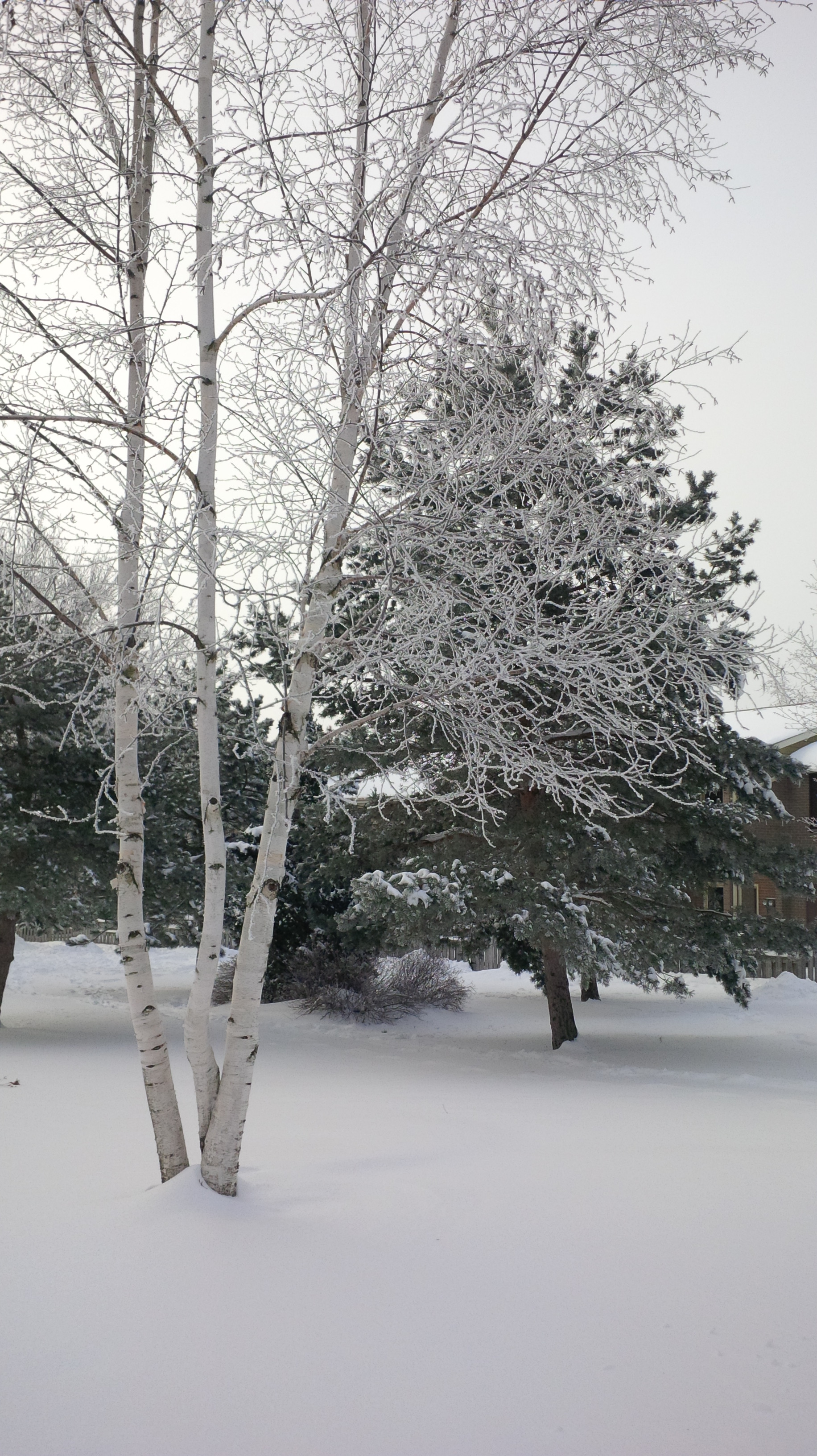
    One thing that I’m not using as much on my Z10 but that I can see a lot of other people using is the filters that are built into the camera.  I have to confess, I’m not huge on Instagram – mostly because it seems to just be a vehicle to share pictures that I don’t really need to see.  The one thing that intrigued me about Instagram was the photo filters.  I have a photo editing program on my Z10 ( KVAD Group Photo Studio Pro) that allows me to edit any pictures but for the simplified filter effects, I don’t even need to leave the camera.  You can take a picture of the pretty snow:

    photo of a birch tree with 3 trunks in front of a pine tree all covered in snow.
    Snow

    Then you can add any one of a number of artistic filters (black and white, sepia, antique, lomo, whiteboard, watercolor, negative, or sketch), styles (smooth face, sixties, grain, age photo, filmstrip, halftone, cartoon, or big eyes), auto enhance it, adjust the brightness, remove red eye, or change the contrast, sharpness, white balance, and saturation of the picture. Of course you can also rotate the picture, change its orientation or its aspect ratio; all within the editing program that is part of the camera package on the Z10.   The only style I really like to use so far is the age photo. Here’s the picture with the Age Photo style applied.

    %{include image.html url=“/wp-content/uploads/2013/02/img_00000102_edit.jpg” alt=“The same photo but with a large white border around it and several stylistic cracks through parts of the photo to make it look old” description=“The filters are pretty fun”}

    Do you have a BlackBerry Z10?  Are you holding out for the Q10? What is  your favourite feature on the BlackBerry 10?

  • To whet your ‘app’etite

    To whet your ’app’etite

    A number of people have been asking me to review apps for the BlackBerry 10. Gven that I am not currently in possession of a BlackBerry 10 device, I thought I’d write about what I know – some great free apps for the PlayBook. 

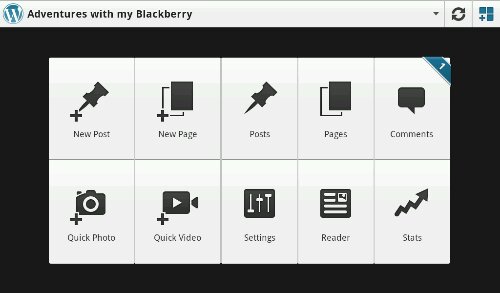
    The first app I want to discuss is the one I’m writing this review on – WordPress for PlayBook and BlackBerry10. I have posted a few blog posts from my Bold 9900 but until recently found the free WordPress clients for the PlayBook unappealing. Then, as I was searching for another app, I saw this one and thought ‘why not’. The app is just as functional as the website.

    The wordpress app for the BlackBerry playbook with 10 icons showing: New Post, New Page, Posts, Pages, Comments, Quick Photo, Quick Video, Settings, Reader, and Stats.
    The main menu screen

    You can manage multiple blogs, approve comments, track your statistics (which is scarily addictive!), edit old / saved posts, read blogs you subscribe to, add quick photos and videos, and, of course, write a new post. You. can write half a post, save it and come back later to finish it up. I love that it’s so easy to add pictures and screenshots right from my PlayBook. I write about my BlackBerry and PlayBook a lot so it makes sense to write on my BlackBerry and PlayBook.

    The only feature that is missing when typing using the WordPress app is the awesome autocomplete feature of the PlayBook’s keyboard. I’m so used to the PlayBook finishing my words that I get annoyed when the feature doesn’t work in an app. I do like that I can manage multiple WordPress blogs from the app and that switching between them is one-touch easy.

    What’s your favourite app for the PlayBook?

  • Elevator Pitch

    Elevator Pitch

    Somebody asked me today to explain, briefly, why I’m so enamoured with my BlackBerry Bold 9900. He said “pretend we’re in an elevator and you need to explain why you like it, not as a sales pitch but as someone who uses the product.” I am familiar with the concept of the elevator pitch and this is what I came up with:

    My BlackBerry is a tool, not a toy. It does everything I want it to and does it in a way that works for my lifestyle. It is reliable, fast, secure, and looks awesome. I use my BlackBerry as a phone, for email, for social media, to text, to get from point A to point B with BlackBerry Traffic, and to use BlackBerry Messenger (BBM). I play games and watch videos on it too, but the primary function of my BlackBerry is to help me be productive. I can open, read, edit, and save documents and share them with friends and colleagues from the dock or from my desk. I can take amazing pictures and share them instantly. It fits my hand perfectly, isn’t too big to put in my pocket, but has a screen big enough to watch a video if I choose. The fact that I’m supporting a Canadian company is just the icing on the cake.

    I wanted to add all of the awesome things I’ve heard about BlackBerry 10 and my impressions from the few times I’ve been fortunate enough to check out a Dev Alpha but until I have a BlackBerry 10 device in hand, I felt that I should speak only about what I know and that’s my Bold 9900.

    Well? Why are you part of Team BlackBerry?

    An animated GIF that shows the BlackBerry 10 Logo on a blue screen which fades into text reading Let's Do This
    BlackBerry 10 – Lets do this

  • The Grey Cup with BlackBerry

    The Grey Cup with BlackBerry

    It’s no secret that I love my BlackBerry devices. I also love the Canadian Football League. With the 100th Grey Cup practically in my backyard, I decided that once again this year, I was going to go and report from the big game without taking my old and heavy laptop. This year, however, I did add the BlackBerry Bluetooth keyboard for my PlayBook. This gave me more functionality with very little additional weight.

    I also added a second battery and charging case (which is basically a small case for the extra battery that you plug the regular micro usb adapter into) for my trusty Bold 9900. I knew I would be putting in some very long days and didn’t want to need to find somewhere to plug in my BlackBerry. Between the 2 batteries, I got somewhere in the range of 12-13 hours of heavy use out of my Bold each day. My BlackBerry was in hand from the time I got up (around 6am each day) until I finally got back to my hotel room somewhere between midnight and 1 am.

    I was pulling double duty at the Grey Cup this year – as a member of Argonotes (the official pep band of the Toronto Argonauts) and as a member of the media for Rouge Radio.com. I could not have successfully done both things without my BlackBerry calendar to help me keep track of where I needed to be and when. It was indispensable for getting press releases, schedule updates, and interview requests into my hands immediately so that I could add or adjust my schedule accordingly. Between my Bold and my PlayBook, I had everything I needed: email, calendar, documents to go, a voice recorder, cameras, a phone, access to text messages, Twitter, Facebook, and, of course, BlackBerry Messenger.

    I recorded interviews on my PlayBook while tweeting and taking pictures on my Bold or vice versa. I typed game notes on my PlayBook with the keyboard while watching the game. I freaked out another reporter by using the remote control feature to type on my PlayBook from 2 rows back in the press box. Having words appear on the tablet next to you that you were asked to watch for a couple of minutes can be a freaky experience, especially when the words are addressed specifically to you. (Yes I know, it was wrong to use my PlayBook to freak out other people but it was a prank I’d been planning for awhile and the opportunity presented itself at the Vanier Cup on Friday night.)

    The combination of my Bold 9900 and my PlayBook were all I needed to make the most of my Grey Cup experience – no need to lug around a heavy, awkward laptop, a voice recorder, or a camera – just my trusty BlackBerry Bold 9900 and my PlayBook.

    I will note that being able to update my Facebook, Twitter, and BBM statuses with things like “I just drank out of the Grey Cup” was awesome. I uploaded a ton of Photos, directly from my devices, often while walking between events.

    Have you ever used a tablet instead of a Laptop? Would you consider leaving the laptop at home for a major conference or event?

    Exterior view of the Rogers Centre with 2 banners, a horizontal one reading 100th Grey Cup and a vertical one featuring an image of the Grey cup
    Banners outside the Rogers Centre

    [

  • 2 am ramblings

    2 am ramblings

    Tonight, I tried to fill my head with beauty to mitigate the horror my mind is imagining to go along with the news stories I read. I worked a holiday concert for a local Montessori school – over 150 children singing and making music and generally being children – which helped a bit. After that I went to my friend’s house, gave their 3 year old her Christmas present and helped her get ready for bed. Her hugs helped mend my heart a bit too. I got to cuddle a 6 month old baby and spend time with his parents. I got caught up in the TV show Arrow (yes… there is beauty there too). I even stayed too late and watched an episode of Doctor Who.

    At this point it was 1 AM and I really should have gone home to bed but I couldn’t do it. Instead I drove 5 minutes further west until I was outside the city limits and found a side road to park on. I had my BlackBerry with me for safety and took a blanket, my padded stadium cushion and my mittens and just sat in the dark. In the span of half an hour I saw 14 meteors. I sat quietly, and prayed for the world and for the families that wouldn’t be getting any rest tonight.

    After 30 minutes, I drove home, got into my fuzzy pjs and am writing this. I’m not healed by any stretch but my soul feels a little lighter. Sometimes a bit of alone time with astronomical phenomenons in the dead of winter can help our minds proccess the unimaginable.

    Hug your children (or other people’s children)! Go out and sit in the dark. Volunteer. Choose your method of healing but acknowledge that our lives have changed forever with the senseless deaths in Connecticut.

  • Making sense of the senseless

    Making sense of the senseless

    I woke up this morning, a little bleary eyed but happy. I went to babysit a friend’s 6 month old while she volunteered at her daughter’s preschool. Nothing out of the ordinary. This afternoon I sat looking at my BlackBerry in disbelief as I read the stories out of Newtown Connecticut. I spent the better part of an hour just staring at my twitter feed on my BlackBerry as if my doing that would somehow change the news. I wanted this to be a tragic mistake, that somehow, through some kind of Christmas miracle, those children and adults wouldn’t be dead. I cried a bucket full of tears. It put everything in perspective – yeah the job hunt isn’t going great right now but I’ve got a supportive family and a great network of friends. It could be so much worse.

    I just don’t understand what has to be going on in someone’s mind for them to take a semi automatic rifle into a school full of children. Yes there is something to be said for gun control but there is also something to be said for the identification and treatment of mental illness with which the shooter was clearly suffering. With the gunman amongst the dead, we will never know his true motivations. What I do know is that there are 26 people, 20 of them children who won’t get to celebrate Christmas. That is a national tragedy.

    Please: Go hug your kids, your neighbour’s kids, a friend’s kids. Tell your family how much you love them and how mich they mean to you. Try and make something good come out of this truly senseless tragedy.