Blog

  • How my Playbook saved the evening.

    How my Playbook saved the evening.

    I was visiting my parents last weekend and one evening, we were bored.  There was nothing on TV and we were all talked out.  Yes we have tons of DVDs but there wasn’t one that we could all agree on.  That’s when my inspiration struck.  I got out my Playbook, connected it to the wireless network, and grabbed my HDMI cable.  Luckily, my parents have a new TV with a very conveniently placed HDMI port on one side.  I plugged in the playbook, switched the source feed on the TV to the HDMI port, and all of YouTube was at our disposal.  We spent a very enjoyable evening watching music videos ranging from Great Big Sea to Gordon Lightfoot with some Simon and Garfunkel and The Guess Who sprinkled in.

    I also showed my parents, who don’t use YouTube unless I send them a link to something, some of my favourite videos. Then I played a slideshow of the pictures I had on my playbook.  Not every video looked good on the big screen but we could all watch them and it was a really enjoyable evening.  Although I don’t have any kids, if I did, this would be an awesome way to show videos of the kids taken on the Playbook to friends, relatives, living further away who happened to visit.  It’s a good thing that Dad has a playbook because I think the evening of YouTube might just become a family tradition.  The next time I’m home, I’m going to set up the Remote control on the Playbook and sit on the couch to direct the action.

  • Protect yourself and your smartphone with BlackBerry Protect

    Protect yourself and your smartphone with BlackBerry Protect

    BlackBerry Protect is one of the most useful tools available from BlackBerry app world.  Not only is BlackBerry Protect a convenient way to backup your data wirelessly (for those times when getting to a computer and backing up data the old fashioned way just isn’t convenient) but if your BlackBerry is lost or stolen, BlackBerry Protect can help you find it.

    BlackBerry Protect is not a substitution for backing up your data regularly, but it does mean that if something happens to your BlackBerry, your contacts. memos, text messages, calendar entries, browser bookmarks, password keeper entries and wi-fi profiles can be restored, either to the same device or to a new one.

    If you lose  your BlackBerry, or it is stolen, BlackBerry Protect can help you find it by showing you the location, making the device emit a noise, or display a custom message on the homescreen.  Furthermore if the device is stolen, you can lock the device, change the device password or delete all the data from the device.  The only downside is that you can’t use BlackBerry Protect on a device that is associated with the BlackBerry Enterprise Server.

    Pretty awesome eh?  I’m sure you want to get BlackBerry Protect up and running as soon as possible on your BlackBerry.  Here’s how to do it.

    On BlackBerry 7 OS devices, BlackBerry Protect is already in your applications folder.  If it isn’t there or if you’re not running a BB7 device, you can download it free from BlackBerry App world.  Click on the BlackBerry Protect icon.

    %{include image.html url=“/wp-content/uploads/2012/06/munch_2012_06_28_021609.png” alt=“Screenshot of the BlackBerry home screen with 3 rows of app icons visible. There is a gold shield with the BlackBerry Logo in the bottom row that is circled in red and labelled with BlackBerry Protect Icon” description=“BlackBerry Protect”}

    You will have to agree to the license terms, and enter your BlackBerry ID and follow the instructions on screen.  Once you set up BlackBerry Protect, you will automatically do your first backup.  After your first backup, when you go into the BlackeBerry Protect app, this is the screen you will see:

    %{include image.html url=“/wp-content/uploads/2012/06/bbprotecthome1.png” alt=“The BlackBerry Protect Home screen with the words BlackBerry Protect at the top, filled in fields for the BlackBerry ID which is blacked out, Last backup date, status, next backup, and checkboxes for only back up over wifi and allow backup when roming both unchecked. There are icons at the bottom with a file folder with a green arrow pointing out circled and labelled as manual backup, a file folder with a blue arrow pointing in circled and labelled as restire from backup and a grey envelope icon that is not circled” description=“Home screen of BlackBerry Protect”}

    You can choose to only back up over wifi, or to be able to back up while roaming.  You can also do a manual backup by clicking on the button at the lower left of the screen, or restore from backup using the middle button.  The right button gives you access to the BlackBerry protect message centre.

    If you press the BlackBerry button on this screen and select “Options” you can set up BlackBerry protect to suit your needs.

    %{include image.html url=“/wp-content/uploads/2012/06/munch_2012_06_28_023128.png” alt=“BlackBerry Protect Options Screen with the words Application options at the top.There is a checkbox beside Prevent delete of BlackBerry Protect which is checked. Below the Application options are backup options with Automatically Back up checked. The Backup Frequency dropdown is set to daily, and Only back up over wifi and allow backup while roaming are unchecked.” description=“The Options screen”}

    I suggest keeping the ’Prevent Delete of BlackBerry Protect” on.  The frequency of backups is really a matter of personal choice – as is what data you want to back up.  I am somewhat paranoid so I back everything up daily.

    At the bottom of the screen, you can choose if you want your device’s location to be viewable from the BlackBerry Protect website.  I suggest keeping this box checked as well.  Hopefully you will never need to use it but it’s good to know it’s available if needed.

    %{include image.html url=“/wp-content/uploads/2012/06/munch_2012_06_28_030001.png” alt=“More settings on the BlackBerry Protect App. The box for Location Reporting has a check beside I want this device’s to be visible from the BlackBerry Protect Website which is checked.” description=“This setting can help you find your device if lost or stolen”}

    BlackBerry Protect is one of the best kept secrets of the BlackBerry world – spread the news and help other members of Team BlackBerry protect themselves!
  • Identify yourself with the BlackBerry ID

    Identify yourself with the BlackBerry ID

    BlackBerry ID falls into the category of things your really need to do first on your BlackBerry.  It makes life so much easier.  Once you’ve created your BlackBerry ID, you can use your email address and password to log in to any product that supports the BlackBerry ID.  For example, you will use the same one on your Playbook as on your smartphone.  With BlackBerry ID, you can manage apps that you download from BlackBerry App World and keep them if you switch devices.

    Setting up a BlackBerry ID is easy, there are 2 ways to do it.  You can either do it from an app that uses BlackBerry ID – it will prompt you the first time you use something with that feature, or you can do it online by going to the BlackBerry ID website and creating one there and then entering it on your device.  If you are using the BlackBerry 7 operating system, you have to have a BlackBerry ID.  Same goes with the Playbook – it’s not an option.   Once you have it though, it makes life so much easier.

    The important thing about your BlackBerry ID is to associate it with an email address you check regularly.  It doesn’t have to be one that is associated with your device but you need to be able to get to the account if you forget your password because that’s where the recovery information will be sent. You can change the details of your BlackBerry ID once it’s been setup.  To do this go to options on the home screen, the one that looks like a wrench.

    %{include image.html url=“/wp-content/uploads/2012/06/settings.png” alt=“a BlackBerry home screen with 3 rows of icons visible. There is a wrench icon in the middle row that is circled in red and labelled Settings” description=“Settings”}

    From the settings box go to Device settings – this is where you can schedule other cool stuff like Auto on / off times (more about those in a later post)

    %{include image.html url=“/wp-content/uploads/2012/06/munch_2012_06_28_004519.png” alt=“The Options menu on a BlackBerry with Display, Typing and Language, Device, Call Management, and Security. Device is highlighted in Blue” description=“Device settings”}

    Select “BlackBerry ID” and you’ll get a screen that looks like this (but with your details filled in)

    %{include image.html url=“/wp-content/uploads/2012/06/munch_2012_06_28_005055.png” alt=“The BlackBerry ID menu with fields for First name, last name, screen name and username (email address)” description=“BlackBerry ID menu”}

    Change the details you want to change and then hit the BlackBerry button and then Save. If you don’t save, it will prompt you to do so before you leave the screen.

    BlackBerry ID is becoming more and more integrated into apps, so pick a password you can remember easily or use the password keeper to help you remember it.

  • What’s the secret (Pass)word?

    What’s the secret (Pass)word?

    A few weeks ago, the social networking site LinkedIn was hacked and millions of passwords were stolen.  I dutifully went and changed my password and promptly forgot it.  I have too many passwords to remember them all.  I’ve tried to follow all the password advice I’ve heard over the years – use a mixture of capital and lowercase letters, use numbers, don’t use real words, don’t use dates of significant events, basically don’t use anything that you’ll ever have a chance of remembering.  That’s all well and good in theory but if i can’t remember my password, and I don’t trust my browser to remember my password, what’s a girl to do?  Then, while looking in my applications folder, I noticed an icon that looked like a safe.

    %{include image.html url=“/wp-content/uploads/2012/06/password.png” alt=“Screenshot of a BlackBerry homescreen with 3 rows of icons. In the bottom row there is an icon of a safe on the far left that is circled and labelled with the words it’s a safe for passwords” description=“Password Keeper”}

    I clicked on it and to my surprise, it was an application for storing all my passwords.  I had to enter a password for the app itself, so i created one that I could remember.  After that I hit the BlackBerry button %{include image.html url=“/wp-content/uploads/2012/06/bbbutton1.jpg” alt=“a small icon of the blackberry button which is a tiny version of the BlackBerry logo” description=“I love the BlackBerry Button most of all”} and selected “new” from the menu.  I then got this screen up:

    %{include image.html url=“/wp-content/uploads/2012/06/munch_2012_06_27_152912.png” alt=“Screenshot of the new password screen with the heading credentials and fields for title, username, password, website, and notes. All are blank” description=“The New Password Screen”}

    I typed in “facebook”as my title, my username, my password, and the website address.  Then I hit save.  I repeated the process for all of the sites I could remember that I had a password for.

    In addition to storing passwords (you can change the default setting to either show or hide passwords from the menu), the password keeper can generate a random password for a site.  On the form pictured above, instead of entering a password, hit the BlackBerry button and then select “Random Password” from the list.  You will get a random alpha numeric password – the kind that has no meaning to anyone (but at least you’ll have a program to remember it for you!) You can set criteria for the randomly generated passwords too.  Just click on the BlackBerry button while in the password keeper app and select “Options” You can set the length of the random password, (default is 8 characters but you can have between 4-16), whether it should include numbers, and if you want it to include symbols.    From the options menu you can also decide if you want to allow copying of the password to the clipboard (do you want to be able to copy and paste the passwords or do you want to type them out each time), and how many attempts at the main password you will allow.

    This is a great app and one that is easily missed if you’re not looking for it.  Yes it takes a bit of time to set up but once you’ve done the initial set up, it’s great – as long as you can remember the main password!

  • Near Field Communication

    Near Field Communication

    One of the features of my BlackBerry Bold 9900 that I hadn’t explored until recently was the ability to use Near Field Communication or NFC. NFC is used with BlackBerry Tag – it allows you to share apps, files, video, music, voice notes, pictures, and contact information with another NFC enabled BlackBerry by simply tapping them against each other.  I have to admit that it’s pretty neat to be able to share pictures with friends simply by tapping my phone to theirs.  I keep waiting for more friends to upgrade to Bold 9900s or other BB7 devices so that I can use it more.

    Another application of NFC technology is in the creation and use of smart tags.  Smart tags are like QR codes but ones that actually work.  The difference is that you need to tap your NFC enabled device against the smart tag to engage them and they can contain more than a website address.  Smart tags can contain a range of information – phone numbers, websites, email addresses, coupons, media files, and graphics.  They’re very versatile.  With the Bold 9900, you can create and view smart tags.  I have only found 1 smart tag to view but I’m always on the lookout for more!  As more and more smartphones have the ability to access smart tags, there will be more and more smart tags around.

    To turn on your NFC, go to “manage connections” and select Near Field Communication.

    BlackBerry 7 devices come with a Smart Tags app already installed – it’s found in the Applications folder and looks like this:

    %{include image.html url=“/wp-content/uploads/2012/06/munch_2012_06_26_2259201.png” alt=“Screenshot of the home screen on a BlackBerry with 3 rows of icons visible and one that looks like a gold computer chip with an N on it 2nd from the left in the middle row circled and labelled as the Smart tag icon” description=“Smart Tag icon”}

    So have you used the Near Field Communication abilities on your BlackBerry yet?

  • BBM

    BBM

    One of my favourite applications on my Bold 9900 is BlackBerry Messenger or BBM. BBM is more than simply a messaging system – it’s an easy way to keep in touch and coordinate events with my friends and family.  BBM allows me to share my calendar appointments with the people I need to – I can invite a friend to a concert or my parents to a family dinner.  It also allows me to easily send pictures in a compressed format.  I use this feature while shopping if i need a quick opinion from a friend on a shirt or a pair of shoes.  With BBM connected apps I can chat with my BBM contacts within certain apps such as foursquare or twitter.  The biggest advantage BBM has over text messaging is that messages in BBM can be up to 2000 characters long.  This means that I can send 1 longer message and get the whole story across. My favourite feature of BBM (apart from it not using any of my data because of the plan I’m on) is that I can see when my messages are delivered and read.  I can invite multiple people to join a conversation – which comes in very handy when I’ve been at a large event and want to meet up with people. Adding people to BBM is really easy too – from the “invite to BBM” screen, you can enter the person’s name, email, phone number, or PIN.  If you’re in the same room as the person you want to add you can scan their BBM bar code – it’s really neat and easy to do.

    %{include image.html url=“/wp-content/uploads/2012/06/bbm6_scan_pin_barcode_1729857_11.jpg” alt=“Screenshot of the BlackBerry Invite to BBM screen. Text reads Invite BBM contact, enter a name, email, phone number or PIN then a QR code with the words Scan a BBM barcode and a groups icon with select from BBM groups” description=“How to scan a BBM Barcode”}

    Displaying your bar code for others to scan was a bit tricky at first but then I learned that all I had to do was hit the BlackBerry button

    while in BBM, select “view my profile”, and then scroll down to “personal bar code” and select “show”.  Quick and efficient.

    A feature that I’ve started using recently is BBM Groups.  BBM groups are different from simply having a chat with multiple people in it.  For starters you can have people in your BBM group who aren’t on your BBM contact list.  You can have up to 30 people in a BBM group.  I have one for my football contacts and love being able to make and share appointments and pictures quickly within the group.  Joining a group is as easy as scanning the group bar code.  You can invite other people to join a group you’ve made by getting them to scan the group bar code as you display it on your phone.   I was a guest of BlackBerry at the Manulife Financial LPGA tournament in Waterloo last week, I couldn’t attend the final day (Sunday) due to other commitments, but because I had scanned a BBM bar code from BlackBerry@LPGA I was kept up to date with tournament and scoring information.  Several other organizations have similar promotions – you can become a BlackBerry Blue Jays Insider by entering the PIN or scanning the bar code found at Bluejays.com.  This gives you access to contests, video content on your device, score updates and more.

    To be honest, I never thought I’d use BBM as much as I do.  It has become something I just can’t live without.

    %{include image.html url=“/wp-content/uploads/2012/06/0641b_bbm-logo1.jpg” alt=“The BlackBerry Messenger (BBM) logo with a black speech bubble with the BlackBerry logo in front of a blue speech bubble that you can only see on the bottom of the black bubble” description=“The BBM Logo”}

  • The Camera Question

    The Camera Question

    By far the most frequent question I get asked about my Bold 9900 is about the camera.  People ask why I would want a smart phone with a crappy camera.  My answer is simply, I don’t.  Here are the specs on the camera on the Bold 9900:

    • 5 megapixel camera
    • 720p HD video recording capability
    • 4 x digital zoom
    • Flash
    • Geo-tagging (So helpful when sorting through the pictures!)
    • Zero shutter lag.  ZERO.  You can capture a memory the instant it occurs.
    • Multiple scene modes.  I actually find this very useful – I have tried out all of the modes, and while Auto is great, the Party and Landscape modes are quickly becoming favourites.

    All of this wouldn’t be worth anything without the amazing resolution on the screen – VGA 640×480 high resolution with 287 pixels per square inch.  In short – pictures I take on my Bold 9900 look fantastic on my handheld and on the computer.

    The touch screen on the Bold 9900 is also very useful for taking pictures.  You can zoom in or out swiping the right side of the screen, you can either use a key or touch the camera icon in the middle to take a picture.  When you are looking through your photos, the touch screen enables you to easily move between pictures.

    I have a 32gb MicroSD card in my Bold so that I can keep photos on the phone, but also transfer them easily with the help of an adapter to any compatible device.  I would highly recommend getting a card if you’re going to be storing music or photos on your Blackberry.

    A picture really is worth 1000 words, so here is one I took with my Bold 9900 at a friend’s party.

    %{ include image.html url=“/wp-content/uploads/2012/06/toronto-20120511-00162.jpg” alt=“A 2 or 3 year old girl is seen from behind with blonde hair in pigtails and wearing a fancy black party dress kneels and looks out a window towards a patio outside” description=“Looking through the window”}

    Oh and the header on the blog?  Yeah, I took that with my Bold too.

  • A word of Introduction

    A word of Introduction

    TardisBerry
    My Beloved Bold 9900 – as a TARDIS !

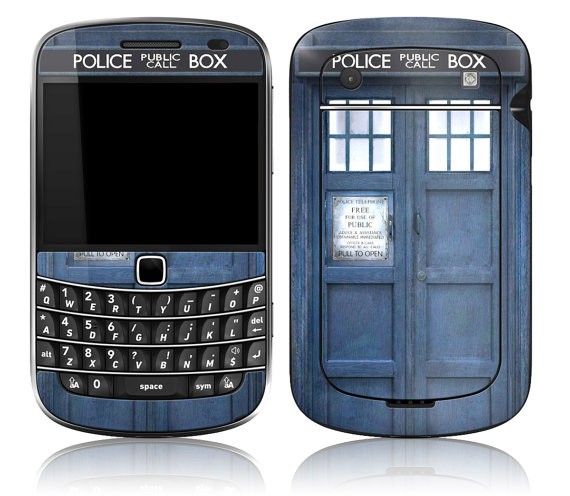
    Welcome to my new blog.  People keep asking me why I’m so devoted to my BlackBerry (both the Bold 9900 and my 64gb Playbook) so I’m starting this blog to try and explain.  It’s not just that I live in the Kitchener-Waterloo area and have had more exposure to the BlackBerry brand.  My dad has had a succession of BlackBerries, starting with the “Brick berry” going through the pearl (he was not a fan, nor was I) and after seeing my Bold 9900, he decided he needed the latest and greatest BlackBerry too.  I didn’t make my choice of phone lightly.  In the spirit of full disclosure I will say that I got my BlackBerry Bold 9900 free after winning a BlackBerry sponsored contest on Twitter.  Even so, if it wasn’t the right phone for me, I would have sold it and found something else.  I want a smart phone that is actually smart.  I don’t play many games (except cribbage and word mole – they’re surprisingly addictive) on my phone.  I use my phone to talk to people.  Whether it’s by BlackBerry Messenger (BBM), Text messages, Twitter, Facebook, or e-mail, my BlackBerry never lets me down.  I love the fact that it has a keyboard and a touchscreen – I can type much faster on the keyboard than I ever could on my IPhone, and I still get the fun of a touchscreen to flip between pictures quickly.  It’s the best of both worlds.  Oh, and the camera rocks.  I also found a skin on Etsy that made my BlackBerrry into a TARDIS from Doctor Who.  Yes, I geeked out my BlackBerry Bold.  

    Front and back views of a BlackBerry Bold 9900 with a skin on it that looks like the TARDIS from Doctor Who - a blue police call box.
    The TARDISBerry

    I’m a real person and I need a smartphone that allows me to communicate effectively.  For me, that’s my Bold 9900.

  • Please Excuse my absence.

    Please Excuse my absence.

    It’s been a rough couple of months. Every time I think I’m going to get back on track and blog again something happens. First it was pneumonia. I have had it before but I had obviously forgotten just how much it takes out of you. I ended up pulling the muscles between my ribs by coughing so much. Let me tell you – sitting at the computer (or anywhere really) was the last thing I wanted to do. Then, my house was burglarized. I am thankful that it was only material goods that were stolen (Wii, games, DVDs, Monitor, Laser Printer) but it’s still shaken me. I’m pretty good at putting on a happy face and going out into the world but having my space invaded and *my* things taken scared me. It’s especially frustrating since I’m still looking for work and don’t have the money to replace what was stolen. The total for the stuff that was stolen was just under my deductible on my renter’s insurance so there’s no point putting a claim in.  I’ve had to evict a housemate because he a) didn’t pay rent and b) took a swing at me when I asked him about the rent.

    The lack of a full time job is also frustrating.  I have applied for over 100.  I’ve been interviewed 10 times (and yes I know that a 10% interview rate is good) but keep hearing that I’m overqualified.  I’ve been lucky enough to find contract work redoing a doctor’s filing system to add dividers and repairing all the broken file folders.  It’s hard work but it’s work and I’m grateful for it.  I’m not sure what the future will hold.  I’ve had more than one company tell me they want a full social media plan as part of my application for the job.  Um.  I’m pretty sure that’s what you’d be HIRING me to do.  If I gave it to you as part of my application, why would you hire me?  Why not just steal my ideas and get someone else to implement them?  I know I sound jaded.  I hate sounding jaded.  I am a trusting person by nature and I hate that I’m becoming less trusting.  I want to see the best in people.  I want to work where my ideas will be appreciated and where I can learn new things.  I want to be challenged in my work.  Is that really too much to ask?

    This wasn’t the post i sat down to write today.  but it’s the one that needed to be written.  Hopefully now that I’ve jumped back in, my words will come more freely.


  • Why I love the CFL

    Why I love the CFL

    Recently I’ve had a number of conversations on twitter and out in the real world about the CFL and how it’s seen to be bush league or second tier.  First off, if you were one of the people with whom i had those conversations, I’m sorry.  I must have seemed like a zealot.  The fact is I love 3 down football.  Always have.  Maybe because i was exposed to it years before the 4 down version.  I know I that I live and breathe Canadian Football.  I’m sure the nice people at Toshiba were sick of me by the end of the She’s Connected conference.  While most of the other women there were worried about which apps were available for their kids, I kept asking about football apps.  (In case you’re wondering, I want an app that lets me create and run plays against multiple defensive schemes and – most important of all – allows the right number of players on the field).

    Yep.  I’m addicted to football.  I enjoy NCAA and NFL football too (Michigan State Spartans and Detroit Lions!) but given my druthers, I’d much rather watch 3 down football.  It’s not just the speed of the game (though on average it takes 45 minutes less to play a CFL game than an NFL game – and I’d argue that only about 20 minutes of this is commercial and the slightly (2 mins) longer halftime (again due to commercial breaks)) it’s the character.  I like the 20 second play clock because it keeps the game moving.  40 seconds feels like an eternity to me and i find myself yelling at the TV during NFL games for the Quarterbacks to “Hurry up”.

    I take issue with people who call the CFL second rate.  It’s not a second rate league in anything except the TV revenue.  In fact, until the late 1970s NFL players came up to the CFL because they could make more money!  People such as Cam Wake who have played in both leagues have said that the NFL isn’t a tougher league, just different.  In fact, in an interview with ESPN 760, Cam Wake said that the rules made the CFL tougher to play in as an outside linebacker.

    He’s right – and the changes don’t just make it harder for the Defence either.  The wider field has been known to give NCAA Quarterbacks, even those who have won a Heisman Trophy fits.   Wide receivers can have problems adjusting their routes to the wider field.  The extra 10 yards in field length makes running a kickoff back for a touchdown that much harder.

    Then there’s my favourite difference between the CFL and the NFL – the 3 downs.  Having 3 downs means that you actually have 2 real attempts to get the ball 10 yards.  This means that running (which typically averages 3-4 yards a carry) won’t get you a first down.  So there are more pass attempts in the CFL.  Take Sunday’s Eastern Semi-Final as an example and compare it to one of the NFL games on at the same time.  The LOSING Quarterback in the Eastern Semi-Final completed 30 of 42 pass attempts for 513 yards.  AND HE LOST THE GAME.  In contrast, Tim Tebow, the quarterback for the Denver Broncos, DID NOT MAKE A PASS ATTEMPT IN THE FIRST HALF.  At the end of the game he was 2 for 8 for 69 yards.  You just can’t do that in the CFL.  You have to have a good passing game as well as a running game to mix things up or you’ll be eaten alive. (Note the troubles that both the Argos and the Riders had this year as an example – though you *can* win in the CFL without a solid passing game, it’s much harder and usually at least partly dependent on special teams).

    The Rouge.  Oh the Rouge.  I love the Rouge (and not just because I’m on RougeRadio.com).  I have had to explain the Rouge until I’m literally red in the face.  It’s not a reward for missing a Field goal.  It’s a reward for preventing the other team from running it out.  If it was simply a reward for failure, it wouldn’t be awarded on a punt.

    No Lead is Safe – this is the CFL’s most recent ad campaign.  It’s very true.  Very few games are complete blowouts with no chance for redemption.  In the final week of the regular season, I stayed up really late to watch Montreal at BC.  Even though BC had a decent lead at the half, I didn’t want to go to bed because I have witnessed Anthony Calvillo put up insane numbers in one half, so I couldn’t trust that it wouldn’t happen.  It didn’t but overall, it seems that the last 4-5 minutes of a CFL game end up having more weird and wacky endings than the NFL ones.  (the one thing that drives me nuts with the NFL play clock is that with 1:30 on the clock, and a fresh set of downs, the QB can take a knee and the game’s done.  You’d have to get at least a 1st down in the CFL.

    Finally, I love the CFL because Our Balls are Bigger.  It’s not just a slogan.  It’s true.  I even have the T-Shirt.