Tag: BlackBerry

  • How my BlackBerry Passport Equals Mobile Freedom

    How my BlackBerry Passport Equals Mobile Freedom

    It’s no secret that I love my BlackBerry devices. I have a BlackBerry in my hand for a good 60% of the day.  One of the things I love most about BlackBerry is how easy it makes it to work on the go. I wrote about my Blackberry Classic  and how much I loved it and the difficulties in choosing a case for it. I’ve found the same thing with my BlackBerry Passport. I love the Passport even more than the Classic. At first I thought it was going to be too big. I looked down at the device in the box and thought “I’ll probably be using the Classic again within a month”. Well, I was wrong. So very wrong. The Classic has found a new home in the hands of my dad, and the Passport is mine, all mine. I mentioned with regards to the Classic how much I had missed the physical keyboard even though I had loved my Z30 with all my heart. Well the Passport takes the keyboard experience to a whole new level. It just feels right.  The screen width on the Passport makes reading text a breeze – the wider screen allows more characters which reduces scrolling (and makes me a happier reader). Contrary to what I thought before I had a Passport, the Passport does fit in my pants pocket, and in my purse, so it goes pretty much everywhere I go. I have a BlackBerry hard shell case on it 90% of the time and a Folio case with a credit card slot the rest of the time (It’s an aftermarket one, but needs improvements if it was going to be a daily driver).

    Last fall, I talked about the Blissdom Canada Social Media Conference and how I presented a micro-session there. What I didn’t say was that I did most of the planning for that session on my BlackBerry Passport. I didn’t want to have to carry my laptop around for the day, or make the trek back across Blue Mountain Resort to drop it back in my room. Instead I used Docs to go, and planned out my entire presentation on my mobile device. I travel 1-2 days a week and work remotely. Lately I’ve been doing all the work I need with just my BlackBerry Passport. I have a list of clients and projects on the go in BlackBerry Remember – I love how easy it is to add notes to items or mark items as finished and how I can flag email messages and attach them to the task list so that I’m not constantly going back and forth to check details from an email. I currently have 14 projects on the go and they’re all lined up neatly within the Remember app. In May, I’m going to be speaking at ROAM – another Social Media event – this time in Vancouver. My travel arrangements are in BlackBerry Travel – including confirmation numbers, hotel phone numbers, and event details. If someone asks me where I’ll be on one of the days when I’m in Vancouver, all I have to do is open BlackBerry Travel and all the information is right there.  I’m not taking my laptop to ROAM either. Having attended a number of conferences in the last 12 months and presented at one, I’m confident that my BlackBerry Passport will be all I need to work on the go.

    Working remotely via the BlackBerry Passport is awesome. One of the things that I love most about working from my BlackBerry is that unlike some other phones where you can only edit or view a document on the go, my BlackBerry Passport allows me to start a new document or spreadsheet, so I can start on a new project before I get back to my computer.  Given that the vast majority of my work is done in either Excel or Word, the ability to start documents is a must. There are so many little things to love about my Passport too – The Hub, for example. I’ve written about my love of the Hub before but it’s at a new level now that I’m emailing attachments almost daily. I love that I can search through email attachments directly from the hub while I’m on the phone with a client – there’s no lost time, which is good since I have very little to spare these days.  I love the way my Passport looks too – fashion isn’t a deal-breaker for me but it’s nice when function and fashion meld together so seamlessly.

    %{include image.html url=“/wp-content/uploads/2016/04/IMG_20150515_162425_edit.jpg” alt=“A BlackBerry Passport – a square shaped cellphone with a physical keyboard in a box” description=“I think this is one of the coolest looking phones out there.”}

    My Passport battery gets me through the work day – and I’ve been told I’m exceptionally hard on battery life due to the number of high drain apps I like to run at the same time. I use Facebook a lot for business these days, and while the loss of the dedicated Facebook app was hard on me, I actually enjoy the mobile browser experience more in terms of the capabilities to manage my pages. I’ve been off of Twitter lately due to some ugliness there, but check in via Blaq or the native Twitter app daily even if I’m not tweeting as much. I’m hoping that the problem has been solved by my recent blocking spree, and will be back to using Twitter to talk about the things I love.  Instagram – while there isn’t a native client for Instagram, there is a great app called Igrann that gives me all the access I need to take amazing photos and share them with the world. I love how easy it is to edit pictures in the native BlackBerry photo editor and a huge bonus is the 1:1 ratio that is the default on the Passport – making all my pictures perfect for Instagram without cropping (Yes, I know cropping is pretty simple but hey…saving time and effort is awesome). The Passport camera is amazing and I love taking effortless panorama shots.

    A panoramic view of the football field inside skydome taken from the 200 levels. There are players warming up on field and fans in the stands.
    Panorama picture from the last Argos game at the Rogers Centre. I love how panorama mode allowed me to capture everything in one shot.

    I use BlackBerry Messenger to set up meetings more than I use email now. I’ve convinced quite a few of my clients to try out BBM for Android or Iphone (those that aren’t already on BlackBerry devices) and love how easy it is to chat, add pictures, and even send works in progress back and forth over BBM. I could do that over text message I guess, but then I’m using MMS which can be expensive for some people, while BBM works over wifi.  I’m not a heavy email user – I probably send 25 a day and receive about 100 that I need to read, but I use my BlackBerry Passport about 95% of the time when I’m sending or reading emails. It’s just that much more convenient.  I also use my car’s Bluetooth connection and have the BlackBerry Assistant read emails to me if I’m driving when an important email comes in.

    Recently one of my friends joked that BlackBerry devices seem to be an extension of me – whether it was my Z30, my Passport, or my Classic, they seem like natural extensions of my body. I choose to take that as a compliment. We are well suited for each other – BlackBerry devices enable me to keep my busy life organized and allow me to work wherever I find myself as long as I have a signal. I couldn’t imagine trying to do what I do without a BlackBerry in my hand – I’m pretty sure it would be theoretically possible, but I know it wouldn’t be anywhere near as enjoyable. Have questions? Feel free to leave them below or find me on Social Media – I’m always willing to help #TeamBlackBerry.  Oh and this post? I wrote it entirely on my Passport – all 1300 words.



  • Word Wednesday #BlissDom Canada ’15 edition

    Word Wednesday #BlissDom Canada ’15 edition

    It’s no secret that I’m an introvert by nature.  I like people and once I’m comfortable with you, I’ll never shut up, but groups of people, make me seriously nervous. I get overwhelmed and then all I can think about is running away and hiding in a corner. Give me a group big enough that I can’t possibly interact with all of the individual members though, and I’m perfectly fine. I loved lecturing to large undergraduate classes, but for the first few weeks of classes, whenever I had to lead a small group seminar I wanted to hurl. Fortunately, I never did, and by all accounts I was really good at being a Teaching Assistant – at least if my feedback sheets were anything to go by. 

    Last year I attended my first BlissDom Canada conference. I was so nervous before going in to the hotel that I sat and cried in my car for at least 15 minutes, then spent another 5 trying to restore my makeup and make my eyes less puffy (so I wouldn’t look like I’d just spent 15 minutes crying in my car). I finally took a deep breath, and went in and had an amazing weekend. I made some amazing connections that have helped me immensely as I started my freelance writing and editing business and some great friends who have become a huge part of my life.

    This year, when the call for speakers came around, I decided, with more than a little apprehension to go in with a couple of other editor friends and propose a session on editing. While we aren’t doing a panel discussion, together, we are all presenting at BlissDom Canada this year. I will be leading a Mentor Microsession in the #BlissWrites time slot on Friday about editing and how to self-edit effectively (and when you might need to hire a freelance editor like me). Even though I’m presenting about something that I’m super-qualified to talk about, I’m still quite nervous because the microsessions mean presenting to small groups (gulp). Which brings me to today’s Word Wednesday: trepidation.

    Stylized version of the word trepidation
    Trepidation

    Trepidation is one of my favourite words to use, because it rolls of the tongue so beautifully. While I can’t say that I’m a huge fan of feeling like a thousand butterflies have been set free in my tummy, I am used to the feeling of trepidation before any small group speaking engagement, social event, and even calling someone for the first time. Some would call me a worry-wart, I prefer to think of myself as trepidatious (yes, in part because a lot of people don’t actually know what it means so it sounds cool). I try to go through all the “what ifs” – What if my laptop doesn’t work? Can I do everything without a cheat sheet in front of me? (No – I am printing a copy and putting one on my BlackBerry too for good measure.) What if nobody comes?  (I sit in the corner and weep openly? This one has actually kept me up at night. I’m up against some pretty awesome other sessions.) What if I screw something up? Everyone there will be very socially connected, it could be a disaster. (I’m pretty sure nobody would do that, I mean, we’re all very socially connected and everything but it’s not like we need to post EVERYTHING right? RIGHT?)

    Anyway, trepidation is another Latin word (I know, I’m in a rut) coming to English straight from the Latin instead of via another language.  The Latin root of the word is trepido, and the present active infinitive form is trepidare which means to tremble or be afraid of. The meaning hasn’t changed much over the years, in fact, the archaic definition of trepidation is “a trembling or quaking motion”.  I may be experiencing some trembling out of pure nervousness right now.

    It’s almost time to leave,  I have a few errands to run in town and then I’m heading down to the airport to pick up my friend Brandee (who I’ve never actually met before but who I feel like I’ve known FOREVER) and we’re going to go to the Vaughn Mills Concierge experience before heading up to Blue Mountain. I’m hoping the fall colours up there are as awesome as they were last weekend at the cottage.

    A maple tree with multicoloured leaves - mostly yellow but many have bursts of bright red on them
    My favourite tree in the fall – Love the red and yellow


    Trepidation (trep·i·da·tion) noun

    A feeling of fear or agitation about something that may happen.


  • Word Wednesday – In search of the ghost of Tom Thompson

    Word Wednesday – In search of the ghost of Tom Thompson

    It’s been a busy week around here. I spent most of the day Thursday and all day Friday and Saturday getting ready for Dad’s 60th birthday party at the cottage. Thursday I put in a full 8 hours of work writing for clients, packed the car for dad and the dog to leave for the cottage right after dinner, and then went into town to get some supplies for the party (and a card for dad since I’d forgotten to get one when I got part of his present). Somehow, I managed to volunteer for a couple of hours AND get the errands done but it meant I was out until 10:45 pm which was longer than planned. Friday, I got up early, loaded the van with all the last-minute things like gas cans for the boat that can’t go in the night before, packed the cooler, went to the vet to pick up Monty’s special cookies, dropped a bag at home, picked up the ice pack I’d forgotten, and drove to the cottage stopping at Costco and for Gas and other party supplies on the way. I had lists on top of lists on top of lists, with photographs of said lists on my BlackBerry in case I misplaced one. It was supposed to be a quick in and out mission at Costco. Of course, if you’ve ever been to a Costco en route to cottage country on a Friday during the summer, you’ll realize the folly of my plan.

    Actually Costco itself wasn’t the problem. Their debit system wasn’t working though which made for longer than usual lineups and very frustrated people in line. This despite having multiple employees walking through the line-up area announcing that the debit was unavailable but MasterCard or cash would work. I know I heard the announcement at least 4 times while waiting in line. Whatever was messing with the debit system also made the bank machine at Costco not work. People were given the option to put their carts to the side and go out of the store, across the street to a bank (and there were multiple banks available within a 5 minute drive of this Costco) and pay cash for their purchases or they could line up at the one customer service till that managed to have debit service. I didn’t need debit so I was fine but the number of people who screamed at the Costco employees astounded me. I mean, grow up people. Sometimes things happen, and yes, it’s annoying but I highly doubt the Costco employee you’re currently berating woke up and thought “hey you know what would be fun today, pulling the plug on the debit machine to completely screw over customers”, so cut them some slack. (OK the rant portion of this post is now over – I needed to get that off my chest though!)

    Having made all the stops I needed to, I proceeded up to the cottage pulling over a few times because the rain was so heavy I couldn’t see the road. (PSA – when it’s raining cats and dogs put on your headlights people –  yes your daytime running lights give you a little light but they don’t activate tail lights and those are kind of important when driving on the 400 series highways in a rainstorm!) The normally 2.5 hour drive took me a bit shy of 5 hours with the stops and the rain. I was frazzled when I got to the cottage.  My uncle arrived a couple of hours later and we had some dinner which made everyone feel better. I asked dad if it had rained at the cottage and described my drive. He said it hadn’t yet. The speed at which a storm can roll in at the lake never fails to astound me. One minute there are scattered clouds, and the next it’s a downpour. This storm was one to remember too – the wind was whipping the water and the waves on the lake were moving from north to south at high-speed. At  one point I could barely see the end of the dock because it was raining so hard. We lost power briefly but thankfully not for long. The rumbling thunder rattled the windows and the lightning lit up the evening sky. I went and sat in my bedroom with the dog, who, after years of being ambivalent about thunder and rain on the metal roof, has suddenly decided he doesn’t much care for it and would like to be petted and reassured please and thank you. I was glad I’d got all the essentials down from the van before the storm and was hoping the fierce storm would make way for a nice sunny day for the party.  It did.

    Saturday dawned with high heat, humidity, and lots of sunshine. I appreciated the sunshine as I spent six straight hours putting the last touches on the cottage, trying to clean the resin patio furniture, making beds at the rental cottage next door for guests who would be staying overnight, and getting appetizers ready for the party. Dad and my uncle also helped, moving stuff out of the way, vacuuming the cottage, and stocking the beer fridge. They also did some quality testing of each of the 4 types of beer we had in stock for our guests. We all jumped in the lake to cool off, then I jumped in the shower because my hair was legitimately gross from sweating so much while trying to make the patio furniture look less dingy (I swear, I’m just going to buy that plastic spray paint next time). We still had an hour before the first guests were due to arrive – except some decided to show up early. Naturally. For the next 6 hours I ran around like a mad woman – greeting guests, introducing people, getting drinks, making sure there was enough food, meeting and helping the caterer bring down the main course, cleaning up spills, putting leftovers in the fridge, finding containers for the leftovers when the big catering trays wouldn’t fit in the fridge, bringing the cake over from next door, and generally being social.  As an introvert, that party was exhausting. Even with slightly less than 20 guests, I felt like I was always being pulled in a multitude of directions. I tried to escape for a few minutes a couple of different times but one guest in particular seemed to *desperately* need my help to find *something* the minute I closed my door (she also had no qualms about opening my closed bedroom door to ask me things – what if I’d been changing?) so I never managed to steal away for those much-needed recharging minutes alone.

    All of that aside, the party was a great success. Much fun was had, the food was amazing, and the designated driver system I’d arranged worked as planned. Everyone got home safely and I fell into bed about 1:30 am exhausted. Of course I didn’t sleep well because I was over-tired. Which leads me to my Word Wednesday for this week and what I’ve been seeking since Sunday morning.

    %{include image.html url=“/wp-content/uploads/2015/08/coollogo_com-467413.png” alt=“Stylized word Quietude” description=“Quietude”}  

    Quietude – a favourite synonym of mine for tranquility. While this is a working holiday for me in that I have some writing to do for clients, it’s also a week for recharging my batteries by the lake. I’ve been more quiet than normal on Twitter, because I just don’t have the energy to do it right and I’d rather be quiet than simply broadcast tweets without engaging. I’ve got my colouring books and pencil crayons, a stack of books in a TBR pile on my nightstand, a kayak to explore in, a motor boat for trips further around the lake, and a Muskoka chair sitting on the deck that overlooks the lake.  I’m off in search of quietude and know I’ll find it here. I love sitting and looking at the wind move the tree branches. Several of the pines I saw on my boat ride on Monday looked like they’d leapt off of the canvas of a Tom Thompson painting. Indeed, our cottage is only about 45 minutes away from one of the southern entrances to Algonquin Park where Thompson drew his inspiration from the Canadian Shield. Whenever I see a windswept pine tree, I am reminded of the print we had hanging in the house I grew up in, and of this great Canadian artist who managed to capture the places where rocks, trees, and water meet so vividly.

    The word quietude is one of my favourite words, not just because it’s what I’m often seeking, but because it has a very simple etymology. It’s derived from the Latin word quietus which means (according to my trusty Latin-English dictionary) a stillness or pause; something that quiets or represses; removal from activity; especially: death.  While death is somewhat extreme, I am enjoying the removal from activity, and the stillness of the lake. I’ve included a couple of pictures I took on our Monday boat ride up the lake that capture some of the quietude I find up here.

    Quietude (qui·etude) noun

    The state of being quiet or calm; tranquility.

    trees grow out of giant rocks forming the Canadian Shield
    The trees seem to just grow out of the bare rocks. There is so little soil that I’m constantly amazed more don’t topple over into the lake.
    Fir Trees on the rocky shoreline of a lake
    I love this group of trees, close to the cottage of a childhood friend. Whenever I go by and it’s windy, it looks like they’re waving to me.
  • I’m All About That Case…

    I’m All About That Case…

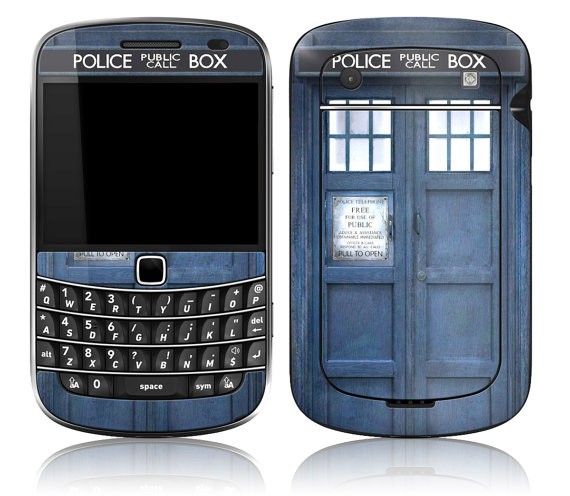
    I love my BlackBerry Classic and my BlackBerry Z30 and I am very excited to be getting a BlackBerry Passport this month. What’s that? I have a phone addiction? It might be more of an obsession than an addiction, but I do love my BlackBerry devices. When I got my BlackBerry Bold 9900 years ago, one of the first things I did was get a screen protector. I didn’t want to scratch the screen or, even worse, chip it. I also made it awesome with some stickers that made it look like a TARDIS (yes, I’m a giant geek).

    A BlackBerry Bold 9900 in a case that makes it look like the TARIDS - a blue police call box
    My Beloved Bold 9900 – as a TARDIS !

    When I got my Z10 at launch, thanks to the BlackBerry Elite program, It had a custom back on it, with a tiny silver spark in the top right corner. I couldn’t bear to cover that up so I left it naked and put on a matte screen protector to carry it around. There are a lot of great screen protectors out there –  I like the matte ones better because they don’t show fingerprints as easily.

    Then I got my Z30.  There wasn’t a special back on it and I actually found it a little slippery.  Thank goodness BlackBerry devices are built tough – I dropped it 3 times in the 2 days after I got it. I tried out 3 different screen protectors for my Z30 – before finally settling on the BlackBerry screen protector. It was easy to install, looks good, and works well.  I have a couple of cases for my Z30 too – one for everyday use and one for special occasions. The daily driver case is another OEM gem. I guess it stands to reason that products made by BlackBerry fit BlackBerry products well. I have the White Transform Hardshell case and I love it. It also comes in black which looks sleek and a little sexy.

    I like the way the transform fits the Z30 without making it feel bulky. It gives me a little extra grip, a bit of colour and it can act as a stand when I’m watching Netflix or another video. For those times when I’m going to be using a bag or a purse, I have the black flip shell case which gives me a little more protection since it covers the screen so it doesn’t get scratched by stuff in my bag. I went with basic black, though I was tempted by some non BlackBerry made cases that were more colourful. The Trident Aegis case shown below was a serious contender until I learned that it didn’t ship to Canada. (If you’re in the US though, you should seriously look at this – click the picture to go to Amazon.com – it’s really nice and comes in 4 colours and I could live vicariously through your phone case.)

    When I got my Classic from “Bob”, it included a great Soft Gel Case, which I loved. Then my dad got a Classic and complained about it being hard to hold, so I lent him my beloved case and haven’t seen it since. I let him keep it because, well, he’s my dad and went looking for another case. Not being one to do things halfway, I ended up ordering two from Amazon and really like both of them. I have the screen protector that came with the BlackBerry soft shell case on the phone right now and it’s doing well.

    For my Passport, I asked around and got 3 very different suggestions, then looked and came up with a 4th of my own. I’m not sure which one I’m going to order yet. The first is the BlackBerry Hardshell Passport Black case- It looks good, is thin and has the BlackBerry logo on the back (which I really like). The second contender is the GMYLE Wallet Case because I loved the transform case’s ability to stand up, this one is a real contender. I’m not sure I’d use the wallet slots though.

    Help a girl out – I can’t choose!

  • Android Applications on my Z30

    Android Applications on my Z30

    I admit to being a purist. I prefer native apps to Android ports. Built for BlackBerry apps give me the best user experience on my Z30, but apps that have been ported into BlackBerry world are a close second.  Android apps? I was reluctant to use them at first, worried about battery drain or security loopholes, but I’ve mellowed out a bit with time. As a rule, I don’t download an Android app if there is a BlackBerry version available. I have the Amazon app store installed on my phone, and it’s pretty nice, if rarely used.  There are, however, three Android apps that I am unwilling to live without:  Waze, the Starbucks app, and Netflix.

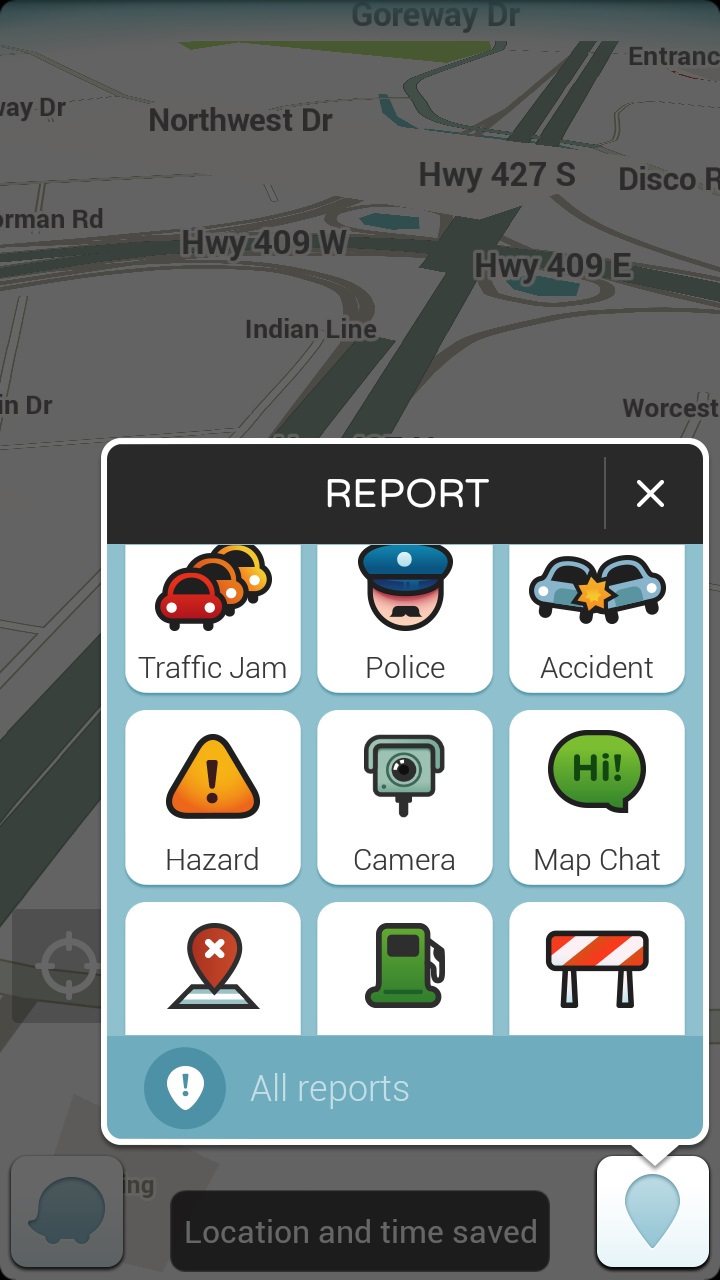
    “But wait” you say, Waze is in BlackBerry world.  Technically that’s true but the version of Waze available in Blackberry World is outdated, full of bugs, and kept crashing on me.  I got so sick of having to change the distance units to kilometres from miles every time I opened the app that I wasn’t using it.  Which is unfortunate because Waze is an awesome app for people who drive.  With Waze you can enter your desitination, choose from 3 different routes, and go.  You can also add a stop – say if your gas light comes on while you’re taking a new route home and you have no clue where the nearest gas station is.  Not that it’s ever happened to me. Okay maybe once or twice.  (Note: I always pull over before using Waze or adding a stop, though with the BlackBerry Assistant that may change since I have voice command over applications).  I wrote a post extolling the virtues of BlackBerry Traffic on my Bold 9900, and when I got my Z10, I gamely tried to use its replacement: Blackberry Maps.  Blackberry Maps is functional if you’re trying to get from point A to point B via the most common route.  The problem is that it doesn’t take traffic into account or road closures.  Driving into Toronto for the past few years, I’ve needed something that can help me avoid the numerous construction closures on the highways leading into and out of the city.  Enter Waze.  More than once, Waze has alerted me to heavy congestion on the road ahead and offered up an alternate route to avoid it.  It even saved Dad and I from parking on highway 400 coming down from the cottage.  (Dad wasn’t sure about the off road journey Waze proposed but gamely tried it and we were cruising at a steady 60 km / hr on backroads while the radio reports had the 400 at a standstill.) Waze plays through the bluetooth connection to my car audio system or through the speakers on my phone.  Either way I get turn by turn directions to my destination – directions which, as a bonus, are in enough time to change lanes without panic.  One of the neat things about waze as a passenger, is that I can report traffic jams, accidents and other issues to help my fellow drivers.  It’s a really easy to use interface too, which is a necessity in a GPS app.

    A map interface with the report function highlighted there are 9 options in a 3x3 grid: traffic jam, police, accident, hazard, camera, map chat, map issue, gas prices, closure
    The easy reporting interface on Waze

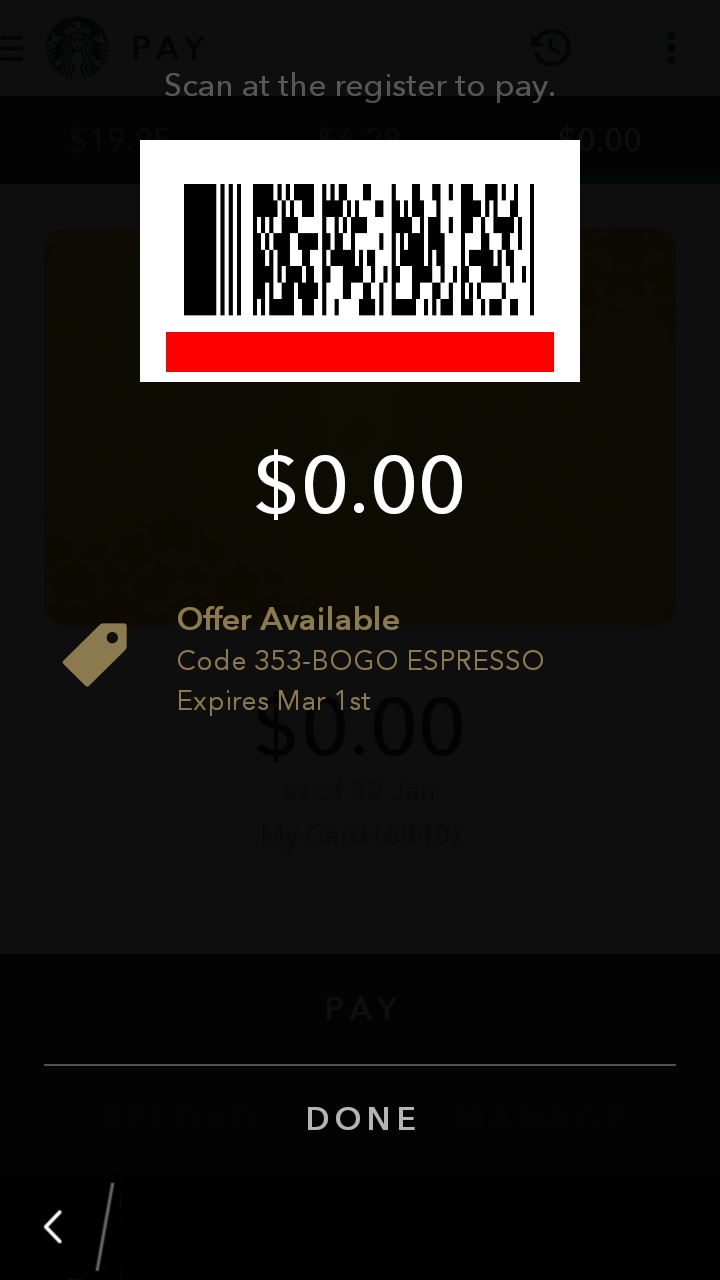
    Now I’m not a big coffee drinker, as a rule, but when I do indulge, it’s a flavoured coffee drink (I love mochas) from Starbucks.  I mainly drink tea and Starbucks has me covered there too.  I registered for a Starbucks card, mostly because I liked the idea of earning free drinks, and because I had a couple of instances of needing a caffeine hit but not having any cash on me and I hate to pay debit for a small transaction.  My big problem with the Starbucks card was forgetting it in my other wallet, or in the car. No it’s not a huge deal to walk back to the car to get my card, but when it’s minus 35 with windchill, it’s something I’d rather avoid.  I’d heard rumors of the Starbucks app working on BlackBerry 10 after an update, so I asked a friend who is a self admitted Starbucks addict. Yes, he’d tried it and it worked! He sent me the application file (I could have downloaded it for myself but he already had it so why bother?) and lo-and behold I had the Starbucks App.  I love this app because not only does it work as a payment card, but when you click “pay now” it pops up the bar code the Barista can scan along with any special offers.  I love that it brings up the offers because I can never remember if there is one on, when it expires, and if I’ve used it.  Remembering stuff like that is why I need caffeine!  The other thing that the app helps me remember is when I get my next free drink.  As much as I like being surprised with the fact that I’m eligible to redeem my stars, I like being able to plan ahead. Plus this is on my BlackBerry.  I may forget my wallet in the car, but I’m not going to forget my BlackBerry!  Win-Win.

    A screenshot showing the payment barcode and a 0.00 balance on the starbucks app. There is a notice that there is an offer available just below the balance!
    The payment screen. I love the offer available post at the bottom!

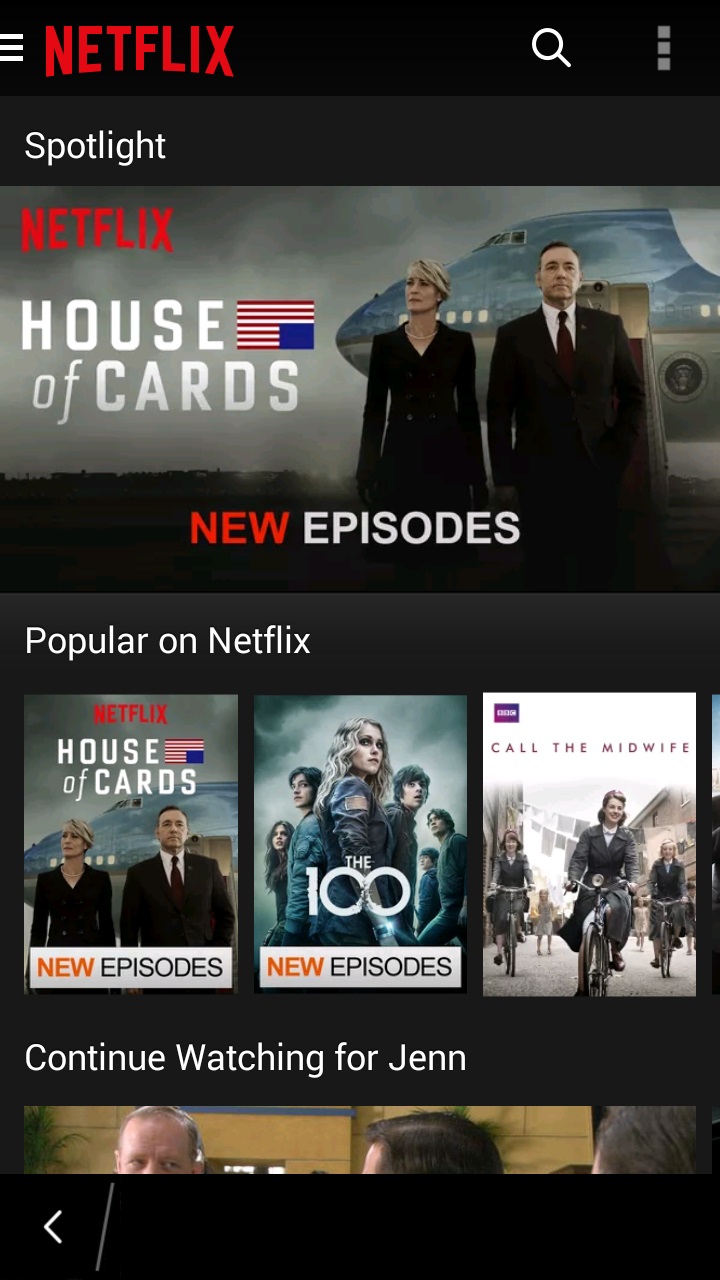
    The final app isn’t strictly necessary but it does make my phone into a super-powered entertainment machine.  The Z30 has a high definition screen and though it’s not huge, it’s not bad for watching video.  I’ve been dealing with insomnia lately and while reading helps, I find that it can wake me up more and sometimes a TV show is just what I need to put the worries out of my head and fall back asleep.  Enter the Netflix app.  I downloaded it, signed in , picked my profile, and voila – my Netflix Library is in the palm of my hand.  While there are some shows I wait to watch on the big screen TV (House of Cards season 3 anyone?), there are plenty of shows that are great viewing late at night.  I watch early seasons of Bones, favourite Doctor Who episodes, and Murdoch Mysteries all from the comfort of my bed.  (Yes I know sleep hygeine says no phones in the bedroom – I bring it in when I can’t sleep – that way if I fall asleep while watching a show, it’s on my bed and not on the couch where I’ll wake up with a sore neck in the morning.) The Netflix app is easy to navigate and keeps the settings (like the picture quality) the same as on your main device.  I also like the fact that you can choose the “Stream over wifi only” setting. This helps to prevent data overage charges, which is always good.

    Screenshot of the netflix app with House of Cards as the banner image and the popular on netflix category immediately beneath it
    The menus on the Netflix app are easy to navigate.

    So those are the three Android applications I have on my BlackBerry.  How many Android apps do you have on your BB10 device?  Are you a purist and have none or did you download Candy Crush the minute you could install Android applications?

  • I’ve been Bobbed!

    I’ve been Bobbed!

    Once in awhile the universe surprises you with something so wonderful, there are no words for it. Then again, I make my living with words so I’m going to find them. I belong to some fantastic groups on BlackBerry Messenger (BBM).  One of them, Team Z30 is a group of people from around the world who chat about pretty much everything. Yes, we are all using BlackBerry devices but we talk about our regular lives as often as we do about devices and upgrades and technological stuff. The members of the group have become like family to me – I worry about them when they’re going through stuff, I enjoy hearing how their day is going, and occasionally, I want to give some of them a good swift kick in the rear.

    The group was named Team Z30 because at the time of its creation, the Z30 was the newest BlackBerry 10 smartphone out there and it was one we all had. As newer BlackBerry 10 phones have been introduced, some members of the group have upgraded to either the Passport or the Classic. As a member of BlackBerry Elite, I get a device upgrade every year. I got the Z30 in late March 2014 which gives me my next device in the next few months. However, a lot of my friends have been asking what I think of the Passport and Classic devices. Having only used them for an hour or so each, I didn’t feel qualified to offer more than a basic opinion on them. I had mentioned this frustration in the group and asked members to let me know what they thought of the new devices so that I could pass on real user opinions to my friends and colleagues who wanted more than just a sales pitch.

    In February, BlackBerry Elites had a promotional code for the shop Blackberry website that gave customers $100 US or $125 Canadian off of a BlackBerry Passport in any colour. I shared the availability of the discount with the group members (and all my BBM contacts) and a number of group members took advantage of the savings to upgrade or get a second device. I love helping people get new BlackBerrys to fall in love with. It didn’t make sense for me to order a new one when times are a bit tight financially and my Z30 is working perfectly fine, so I lived vicariously through my friends who were getting new devices and posting lots of pictures of the unboxing.

    A few weeks ago, one of the members of the group messaged me to say that she had a screen protector for my phone and that she would like to send it to me. I was flabbergasted that someone I hadn’t met in person would do such a thing, but then I remembered that I’ve sent along chargers and cases for phones to people I’ve only known virtually. I sent along my address and waited.

    Then I waited some more. It seems that the Canadian Border Services Agency decided to keep my package for a few days. Then it meandered around Ontario for a few more days. Then, on the 20th, the sender got a message that there had been an attempted delivery and the package was being held at the post office. Except that I’d been home all day and had gone to the superbox at the end of the subdivision and there was no notice or anything else from Canada Post. Strange, but I decided to give it until Tuesday to start raising heck as I’m on a rural route and sometimes my mail takes a bit longer to get from the sorting depot. Tuesday dad was heading out for a business lunch so I asked him to check the mailbox for a slip or a package and let me know. He called to tell me that there was a package being held at the Post office for $55 in “fees”. $55 for a screen protector? That seemed a little rich, even for customs and brokerage fees (and taxes – there are always taxes). So I BBMed my friend. I asked if there was something I should know since I needed to pay a $55 hostage fee for the package. My friend didn’t want to spoil the surprise, but realized that the lovely people at Canada Post had tied her hands. So she told me.

    It wasn’t just a screen protector in the box. It was a new screen for the screen protector to go on – in the form of a BlackBerry Classic! She was quick to tell me that the phone wasn’t from her, it was from an anonymous source who wished to be identified only as Bob.

    Here is the note that accompanied the package: (I am so jealous of the handwriting!)

    %{include image.html url=“/wp-content/uploads/2015/03/img_20150302_141743_edit.jpg” alt=“A handwritten note that says Dear Jenn, You’ve been Bobbed. PS this gift is not from me” description=“It’s a mystery”}

    There was a lot of screaming going on in the family room as I grabbed the heavy duty scissors and went at the multiple rounds of packing tape. I carefully cut off the customs paperwork and put it in a file (I keep stuff like that just in case), then I ripped into the box with abandon. Not only was there a nice new (at least to me), Classic but also a skin and an official BlackBerry pocket to put it in. There was also the screen protector that started the whole adventure, and a piece of delicious chocolate. My day, month, year, have been made.

    %{include image.html url=“/wp-content/uploads/2015/03/img_20150224_153841_edit2.jpg” alt=“A BlackBerry Classic, with 2 different cases, a screen protector, and a small chocolate” description=“So much goodness in one package”}

    So to “Bob”, I’d like to say Thank You. When I get my next upgrade, one of my devices (either the Z30 or the Classic) will be passed on in a similar manner to continue the circle. Your generousity touched me and came at a time when I was feeling low. Knowing somebody cares – makes all the difference. Yet another reason why I am a proud member of #TeamBlackBerry

  • Application Permissions on BlackBerry 10

    Application Permissions on BlackBerry 10

    With all the hubbub recently about Facebook Messenger and the myriad of permissions it requests just to be able to run in the background, I was curious as to what permissions I have given some of the apps on my BlackBerry Z30.   (Okay, the real reason I wanted to know is that I accidentally connected an app to BBM after an update and didn’t want to leave it connected but also didn’t want to delete it and reinstall it if I didn’t have to – Once again, my mistakes become blog fodder.)

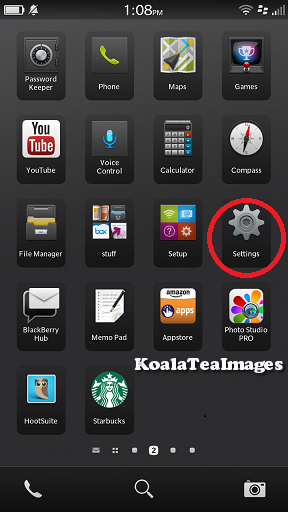
    I asked a few friends and all I got was “delete and reinstall the app and deny the permission” as an answer – which will work but I had an inkling that the BlackBerry 10 Operating System was smarter than than that. So I opened up the settings folder.  It’s the one that looks like a gear.

    A group of application icons with the gear representing the settings icons circled in red
    This is what the Settings icon looks like. I use it a lot.

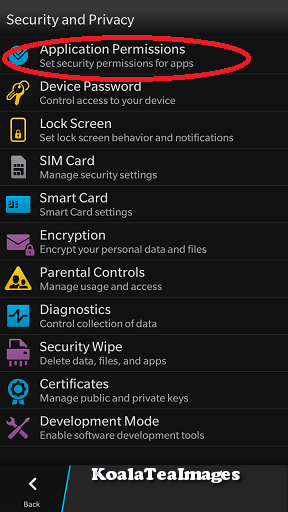
    From there you will want to select “Security and Privacy” which conveniently lists “Permissions, passwords screen lock, wipe” underneath it.

    a listing of all of the system settings with security and privacy circled in red partway down the list.
    The Security and Privacy tab is about halfway down the list.
    The security and privacy settings menu with application permissions circled in red at the top..
    Application Permissions is at the very top.


    Once there, select “Application Permissions”.


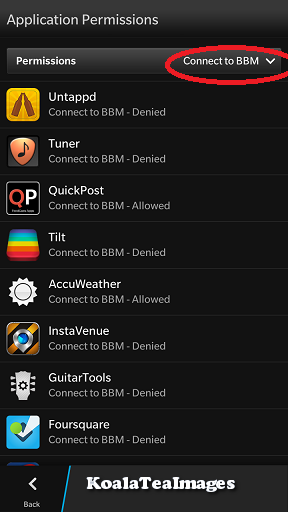
    Within Application Permissions you have a choice, you can filter the permissions by type using the drop down menu – so you can see all of the apps that have requested to connect to BBM for example.

    Your list will look different but these are some of the apps that have requested permission to connect to BBM. I have only allowed one of this set that permission.
    Your list will look different but these are some of the apps that have requested permission to connect to BBM. I have only allowed one of this set that permission.
    Applications permissions drop down list with connect to BBM circled in the middle in red
    There are a lot of options on the drop down list – connect to BBM is near the middle of the list


    By selecting “Connect to BBM” I get a list of all of the apps that have requested this permission and can see at a glance what I have selected.


    You can also look at each of the apps separately and see what permissions each app has requested and what your settings are for that app.  To do this select an app from the list without using the drop down menu.

    The application permissions list with app icons in a list with their version number on the right.
    Select an app to see what permissions you have granted or denied it and to toggle permissions using the slider.

    Here is an example of the Uno app – You can see that I have allowed it permission to access shared files (so it can save games) but not to connect to BBM .  You can use the sliding buttons to toggle permission on and off.

    Permission details menu for the uno app. Shared files and device identifying information are toggeld on with a blue slider but Connect to BBM is toggled off and circled in red.
    Here you can see that I have allowed this app access to shared files and device identifying information but have denied a connection to BBM.

    It is important to remember, that some applications will not run properly without certain permissions, so denying all permissions is not the best strategy.  The good news is that it’s easy to go in and change the settings back if you accidentally revoke a needed permission.  Most apps will even pop up a question asking for that permission to be granted the first time you try and use them.   So that’s application permissions in a nutshell.


    This got me thinking about what the most common permissions were and why they were needed in the first place so I talked to developers and read developer documentation to find some of the most commonly requested permissions and will now attempt to put them into easier (for non developers) to understand terms.

    Contacts:  An application like Twitter (or in my case Blaq since it’s my Twitter  app of choice) needs to be able to access your contacts to bring up the options when you try to tag a friend in a tweet.  Without access to the contacts, you have to type in each twitter user handle manually in a tweet.  (This is not good for someone like me who has a horrible memory for twitter handles.)

    Shared Files: This one is one that looks scary but is actually really benign.  If you want an app such as Igrann (the fabulous Instagram client for BlackBerry 10 -I will write about it soon, I promise) to be able to upload a picture, it needs access to the picture files on your device.

    Camera:  Similar to Shared Files (above), if you want to be able to take a picture with the camera and have it load to Igrann or Twitter instantly without having to go through saved files, the app will need to be able to access your camera.

    Connect to BBM: I tend not to allow access to BBM but that is my choice.  Allowing an application access to BBM means that you can invite other users to download it from the app itself, or even initiate BBM conversations from the app.  It’s a pretty neat permission, I just don’t ever use it so I figure I don’t need apps to have that permission right now.

    Location / GPS Location: Again, this one is pretty self explanatory – if you want to check in on Foursquare or have Endomondo track your run, you need to allow the apps to know where you are.

    Calendar: This permission allows apps such as Facebook to add events to your calendar. I personally love it since I don’t always check the events tab on the Facebook App and have missed events because of it.  This way if I say “I’m going” to an event, it magically ends up in my device calendar with a handy reminder.

    Finally, Run in Background: Most apps don’t request this permission as the BlackBerry development team is pretty strict about which apps they allow to ask for this permission. I only have 3 that request it in my long list of apps. One of the apps that I have that is allowed to run in the background is Blaq.  This permission allows Blaq to keep processing when it is minimized – so that the tweet stream is being refreshed.  It also allows an app like Webex  (a great piece of productivity software), to keep streaming audio and video without losing its place and having to start again.

    Those are the most common app permissions, though if you have any others that you’d like to have explained, ask in the comment section and I will try to find out.

  • Thank You

    Thank You

    I think as a society we focus too much on the negative and not enough on the positive.  This applies to BlackBerry too.  We are all too eager to jump all over the company for a perceived misstep but rarely do we stand back and thank the company and their employees for all of their hard work and dedication to the principles that make BlackBerry the great company that it is.

    Today BlackBerry rolled out Channels for BlackBerry Messenger.  BlackBerry could have done what other companies have done and said “screw legacy users, if they want Channels, they should upgrade to a newer device”.  The fact that they didn’t says a lot about the corporate culture at BlackBerry.  Instead of releasing Channels for the new, flashy BB10 operating system and leaving legacy device users hanging, BlackBerry employees working on channels worked long days, nights, and even weekends in order to roll out Channels to everyone at the same time. To me that says that BlackBerry values all of its customers and wants to bring them all the best experience.  Yes there was an error in the app world description of channels where it said that OS 10.2 (which at this time is still unavailable from US carriers) was required to load the Channels instead of requiring BBM 10.2.  To their credit, within 20 minutes of learning of the problem, the problem was fixed.   No company is perfect, mistakes will be made, but the speed with which the mistake was corrected shows that Blackberry cares about their customers.  Would BlackBerry like everyone to upgrade to the newest devices?  Of course they would.  (If you’re reading this and are on the fence about upgrading to BlackBerry 10 – do it!  It’s an amazing operating system with both touchscreen and keyboard models.) But BlackBerry also respects their customer base enough to realize that not everyone can afford to upgrade, and that even those who haven’t upgraded to a new device or operating system deserve the best possible mobile computing experience.  For that I give a heartfelt thank you.

    Thank you BlackBerry for caring about all of your customers and for providing user experience that shows that your customers are more than just faceless sources of revenue. The next time someone questions my loyalty to BlackBerry, I will direct them to this post.

  • Blaq for BlackBerry 10

    Blaq for BlackBerry 10

    When I said that I would blog about Blaq later, I didn’t think it would be later today.  I am at BlackBerry Live in Orlando next week and I’m not bringing my laptop so I figured I should probably write the review sooner rather than later.

    From day 1 with my Z10, I was frustrated by the native Twitter client (Twitter for BlackBerry).  I realize that it is as functional as Twitter for Android and Twitter for iOS, but I’ve been spoiled with Twitter for BlackBerry 7.  I expected the Twitter client on the BlackBerry 10 devices to be just as functional, and when it wasn’t I was disappointed. I tried a number of other Twitter clients in the first two months I had my Z10: Tweetings, Neatly, RewitQ, and Twitter for BlackBerry 10.  Each of them had some advantages but they were either too slow, too frustrating to use, or missing key features (like lists).

    As many of you know, I’m a Twitter junkie.  I need a fairly robust application to use on a daily basis.  One of my favourite features on Twitter is the ability to sort your followers into lists and follow those lists.  I follow over 1600 people on twitter, and, though I do Twitter purges on a regular basis where I unfollow accounts that are no longer relevant to me, it can still be a lot to handle.  Lists allow me sort the people I follow into groups such as “Formula 1 fans”, “CFL” , and “Journalists” and only follow those streams when I’m feeling overwhelmed.  For example, Monday May 6th was the CFL draft and though I love all my tweeps, I was trying to keep up with the draft picks as they happened.  I opened Twitter on my laptop, went to lists, and selected my football list.  Everything else in my stream disappeared and I could pretend that the world outside of football had melted away for awhile. None of the apps I had on my Z10 before Blaq allowed me to follow lists easily.

    Aside from Lists, the other features that I want in a Twitter application are, in order of importance to me:

    • Multiple Account Support (preferably 3)
    • The ability to quote Tweets when retweeting
    • The ability to Mute hashtags (Sometimes, I just don’t want to hear about #PeopleIWantToPunch)
    • Real time refresh rate.

    It’s not a huge or particularly demanding list, yet until Blaq was released no single Twitter application for BlackBerry 10 had all the features I wanted.  Right now Blaq only allows you to have 2 accounts but I’ve heard that support for 3 is coming and I still have the other applications so the accounts I use less frequently are set up on those.

    Blaq is relatively easy to use.  When you first download it, you need to authorize it to access your twitter account, this is pretty standard. Once you’ve done this the screen will pull in your account and change to the main screen.  The main screen looks like this:

    %{include image.html url=“/wp-content/uploads/2013/05/img_00000446.png” alt=“The feed fro the Blaq Twitter App with user profile pictures and their tweets beside them in a simple list format, There is a green bar at the top of the list that is 90% full” description=“Blaq for BlackBerry 10”}

    The green bar at the top is called the timeline progress bar and fills up as you get closer to the newest tweets in your stream.  The clock on the green bar shows the time of the tweet you’re on while the clock in the top right shows the current time.

    From the main screen, it takes a quick swipe to navigate within the app.  Swiping right gets you the most options:

    %{include image.html url=“/wp-content/uploads/2013/05/blaq.png” alt=“The full view of the Blaq app with the sidebar showing there are 10 icons down the side each with a number.” description=“Blaq has lots of options”}

    To make it easier to understand what each of these options are, I’ve numbered them.

    1. Mute:  Allows you to mute a person or a hashtag.  This can be helpful if there is a twitter party going on and you’re not participating. Selecting this option and then “add mute” on the next screen brings up a page where you can enter your criteria for what you want muted. You can also un-mute from this screen.
    2. Search: Lets you search Twitter for a username or hashtag. Blaq imports saved searches but you can delete them at any time.
    3. Me: takes you to your profile page.  You can see your followers, who is following you, how many tweets you’ve tweeted, and lots of other fun stuff.
    4. Favourites: When you favourite a tweet, they are marked  with a star.  You can find them again later by selecting this option.
    5. Lists – All of your twitter lists are here.  Currently, you can’t edit lists from Blaq but if that changes, I will let you know!
    6. Retweets – These are tweets of yours that have been retweeted.
    7. Direct Messages – you can read and compose direct messages from here.
    8. Mentions – these are all of your @ replies.
    9. Home – this takes you back to your whole twitter feed.
    10. Compose – Tap this to compose a new tweet.

    When you swipe down from the top of the screen, you get a much smaller menu: Accounts lets you add another account or switch between accounts, while Settings allows you to change the font size, set the refresh rate while the app is inactive, and access the tutorial again by selecting Help.

    %{include image.html url=“/wp-content/uploads/2013/05/img_00000453.png” alt=“the BlackBerry 10 Blaq app showing the twitter feed, green progress bar, with a menu showing accounts and settings at the very top.” description=“This menu is pretty easy to navigate”}

    Finally, swiping left allows you to access options directly related to the tweet you are viewing.  This is the action that is the least intuitive in Blaq.  To access this menu, touch a tweet and then pull left.  While holding the menu open, pull the list up or down to access the different options.

    %{include image.html url=“/wp-content/uploads/2013/05/img_00000456.png” alt=“The BlackBerry 10 Blaq app with the twitter feed and green progress bar showing, pulled to the left to show a menu with 4 options” description=“Final menu”}

    1. Allows you to reply to the tweet.
    2. Allows you to retweet the tweet to your followers.  (By default the app will confirm that this is an action you want to do)
    3. Marks the tweet as a favourite (again, the default is set to confirm that you want to favourite the tweet)
    4. Options.  If the tweet is one that you sent, you can delete it from here.

    Earlier, I mentioned that one of my “must have” features in a twitter app is the ability to quote tweets.  You need to select the tweet by tapping it so that it opens up in its own screen.  When the tweet is isolated, touch and hold the retweet button (Circled in red below), and select the Middle option “Quote Retweet”.

    %{include image.html url=“/wp-content/uploads/2013/05/img_00000461.png” alt=“The profile page for the BlackBerry Help Twitter account shown in the Blaq app with the 2nd of 4 menu options, a broken rectangle circled in red.” description=“The Quote Retweet Button”}

    Touching and holding the retweet button brings up 3 menus on the right:

    1. Classic retweet – a nice and simple way to retweet
    2. Quote – puts the item you are retweeting in quotes – useful if you’re going to modify the tweet in any way.
    3. Retweet via – a type of retweet I’m beginning to use a lot more often – great for websites – takes the text of the tweet and then at the end puts (via @username).  It’s a stylistic choice but one that I quite enjoy.

    One last thing about Blaq.  By default, Blaq connects itself to BlackBerry Messenger (BBM). You get an option on every tweet and retweet to send the message as your BBM status or share it with BBM contacts.  I don’t like that option, and so I turned it off.  To do this is a little tricky though.  You need to go to the Settings menu on your BlackBerry (it looks like a cog) –> Security and Privacy –>Application Permissions –>Blaq and switch “Connect to BBM” to off.

    In a nutshell, that’s Blaq for BlackBerry 10.  Have you tried Blaq for BlackBerry 10 yet?  What do you think of it?

  • Apps I can’t live without.

    Apps I can’t live without.

    Hi everyone,
    It’s been awhile – I’ve been busy with life and spending far too much time with my BlackBerry Z10.  The advantage of spending so much time with my Z10 is that I have a shortlist of the “Can’t miss Apps” for BlackBerry 10.  These are my favourite apps, the ones I use on a daily basis.

    1) Password Keeper – This app was standard on earlier BlackBerry devices, and is a free download for the Z10.  It has all the functionality that I wrote about here but is on your BlackBerry 10 Device.

    2) BlackBerry Messenger – Another old standard but one that I use daily to keep in touch with friends and family.  It’s just so convenient.  The Video chat feature on BlackBerry 10 devices allows you to do more than simply type to your contacts, you can actually see them and have a face to face conversation.

    3) BlackBerry Remember – I had my doubts on how useful Remember would be.  I was so wrong.  I use it every single day.  It’s better than any other notepad app I’ve used.  It allows you to flag emails and put them into a file folder within the Remember App, but more than that, it allows you to add photos, videos, voice notes, and documents to the folder.

    %{include image.html url=“/wp-content/uploads/2013/05/img_00000445.png” alt=“A folder on a BlackBerry phone showing 5 different coloured folders labelled: Unfiled entries, BlackBerry Live, Guiding, Stuff and Teacher’s College” description=“The BlackBerry 10 Remember App”}

    I have a BlackBerry Live folder and my airline tickets, hotel confirmation, event schedule, and hotel shuttle emails are all inside that folder so that I can easily find them as I need them.You can assign due dates to items within a folder and never forget a deadline again.  You can also pull in contacts so if you are working on a project with a co-worker, you will have their contact info alongside all the information for the project.  The BlackBerry video about Remember gives a pretty awesome overview of this amazing app.

    4) CrackBerry 10 – I admit it, I’m a CrackBerry addict.  I was going to the website a couple of times a day to keep up with the latest BlackBerry news.  The CrackBerry 10 app for BlackBerry 10 allows me to catch up on the latest news and reviews in a really nicely designed and user friendly manner.  To access the category feature simply tap the CB home button at the bottom of the screen in the app:

    %{include image.html url=“/wp-content/uploads/2013/05/crackberry.png” alt=“screenshot of the CrackBerry app with 4 articles visible and the CrackBerry Logo circled in red at the bottom of the app” description=“The CrackBerry App”}

    Once you do that, you will be greeted with a list of categories – I tend to read everything but if you only want to read reviews, it can be really helpful to go straight to the reviews category.  My favourite thing about the CrackBerry 10 app is that it’s built for BlackBerry.  I have nothing against Android ports but they don’t always work in quite the same way that apps built specifically for the BlackBerry 10 platform.

    5) Blaq – The native Twitter app on the BlackBerry 10 operating system is not as good as the version I had on my Bold 9900.  I use Twitter a lot and needed something better.  I have used Blaq on my PlayBook, so when it was released for the BlackBerry 10 in late April, I eagerly downloaded it.  It took a little getting used to and I’m still discovering little gems like the ability to quote tweets. (You can only do it from inside the tweet itself, not from the main screen) I will do a full post on Blaq soon for all my Twitter addicted friends who need a solid app that works well and is stable

    6) Podcasts – I’m late to the podcast party, but I love listening to them as I walk around town.  I had a few different Podcast apps on my Bold 9900 but my favourite wasn’t available for the BlackBerry Z10.  After consulting some of my fellow BlackBerry Elite members, I downloaded Podcasts for BlackBerry 10.  I love how easy and intuitive the app is to use.  It also doesn’t drain my battery the way other podcast apps have.  The selection of podcasts in the app is pretty good but you can search and manually add your favourite podcasts within the menu if they aren’t on the list.  The only complaint I’ve heard is from my friend Nick who listens to a lot of podcasts while riding his bike to and from work – he would like a feature that skips back 5 or 10 seconds in the podcast when you restart after a pause, so that you don’t miss anything.  I agree it would enhance the app but even without that feature, the app is head and shoulders above any other podcast app for BlackBerry 10.

    These are my favourite (non game) apps so far.  I’m going to be testing BlackBerry Travel next week as I journey to BlackBerry Live, and I will let you know how it works on BlackBerry 10 afterwards.

    What are your favourite BlackBerry 10 apps?  What app do you really want to see on the platform?