Tag: BlackBerry Z30

  • I’m All About That Case…

    I’m All About That Case…

    I love my BlackBerry Classic and my BlackBerry Z30 and I am very excited to be getting a BlackBerry Passport this month. What’s that? I have a phone addiction? It might be more of an obsession than an addiction, but I do love my BlackBerry devices. When I got my BlackBerry Bold 9900 years ago, one of the first things I did was get a screen protector. I didn’t want to scratch the screen or, even worse, chip it. I also made it awesome with some stickers that made it look like a TARDIS (yes, I’m a giant geek).
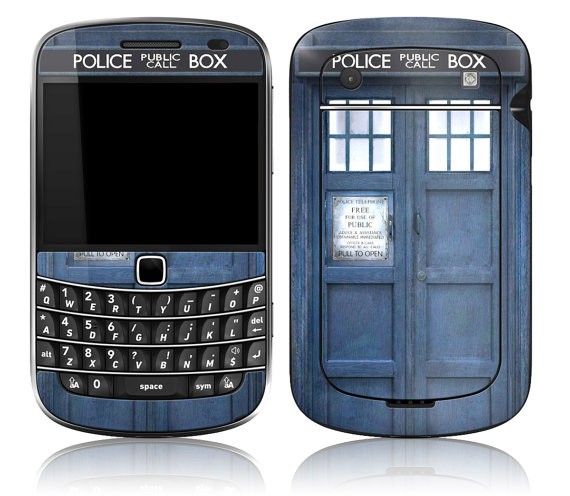
    A BlackBerry Bold 9900 in a case that makes it look like the TARIDS - a blue police call box
    My Beloved Bold 9900 – as a TARDIS !

    When I got my Z10 at launch, thanks to the BlackBerry Elite program, It had a custom back on it, with a tiny silver spark in the top right corner. I couldn’t bear to cover that up so I left it naked and put on a matte screen protector to carry it around. There are a lot of great screen protectors out there –  I like the matte ones better because they don’t show fingerprints as easily.

    Then I got my Z30.  There wasn’t a special back on it and I actually found it a little slippery.  Thank goodness BlackBerry devices are built tough – I dropped it 3 times in the 2 days after I got it. I tried out 3 different screen protectors for my Z30 – before finally settling on the BlackBerry screen protector. It was easy to install, looks good, and works well.  I have a couple of cases for my Z30 too – one for everyday use and one for special occasions. The daily driver case is another OEM gem. I guess it stands to reason that products made by BlackBerry fit BlackBerry products well. I have the White Transform Hardshell case and I love it. It also comes in black which looks sleek and a little sexy.

    I like the way the transform fits the Z30 without making it feel bulky. It gives me a little extra grip, a bit of colour and it can act as a stand when I’m watching Netflix or another video. For those times when I’m going to be using a bag or a purse, I have the black flip shell case which gives me a little more protection since it covers the screen so it doesn’t get scratched by stuff in my bag. I went with basic black, though I was tempted by some non BlackBerry made cases that were more colourful. The Trident Aegis case shown below was a serious contender until I learned that it didn’t ship to Canada. (If you’re in the US though, you should seriously look at this – click the picture to go to Amazon.com – it’s really nice and comes in 4 colours and I could live vicariously through your phone case.)

    When I got my Classic from “Bob”, it included a great Soft Gel Case, which I loved. Then my dad got a Classic and complained about it being hard to hold, so I lent him my beloved case and haven’t seen it since. I let him keep it because, well, he’s my dad and went looking for another case. Not being one to do things halfway, I ended up ordering two from Amazon and really like both of them. I have the screen protector that came with the BlackBerry soft shell case on the phone right now and it’s doing well.

    For my Passport, I asked around and got 3 very different suggestions, then looked and came up with a 4th of my own. I’m not sure which one I’m going to order yet. The first is the BlackBerry Hardshell Passport Black case- It looks good, is thin and has the BlackBerry logo on the back (which I really like). The second contender is the GMYLE Wallet Case because I loved the transform case’s ability to stand up, this one is a real contender. I’m not sure I’d use the wallet slots though.

    Help a girl out – I can’t choose!
  • Android Applications on my Z30

    Android Applications on my Z30

    I admit to being a purist. I prefer native apps to Android ports. Built for BlackBerry apps give me the best user experience on my Z30, but apps that have been ported into BlackBerry world are a close second.  Android apps? I was reluctant to use them at first, worried about battery drain or security loopholes, but I’ve mellowed out a bit with time. As a rule, I don’t download an Android app if there is a BlackBerry version available. I have the Amazon app store installed on my phone, and it’s pretty nice, if rarely used.  There are, however, three Android apps that I am unwilling to live without:  Waze, the Starbucks app, and Netflix.

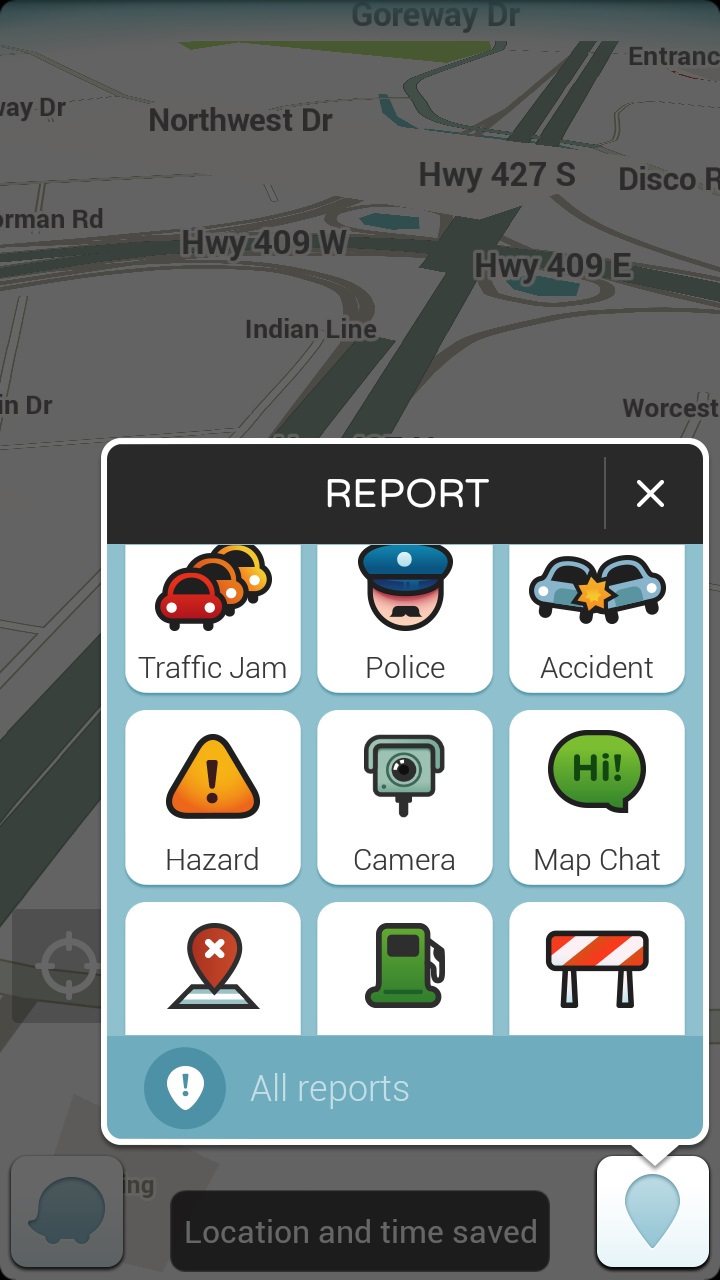
    “But wait” you say, Waze is in BlackBerry world.  Technically that’s true but the version of Waze available in Blackberry World is outdated, full of bugs, and kept crashing on me.  I got so sick of having to change the distance units to kilometres from miles every time I opened the app that I wasn’t using it.  Which is unfortunate because Waze is an awesome app for people who drive.  With Waze you can enter your desitination, choose from 3 different routes, and go.  You can also add a stop – say if your gas light comes on while you’re taking a new route home and you have no clue where the nearest gas station is.  Not that it’s ever happened to me. Okay maybe once or twice.  (Note: I always pull over before using Waze or adding a stop, though with the BlackBerry Assistant that may change since I have voice command over applications).  I wrote a post extolling the virtues of BlackBerry Traffic on my Bold 9900, and when I got my Z10, I gamely tried to use its replacement: Blackberry Maps.  Blackberry Maps is functional if you’re trying to get from point A to point B via the most common route.  The problem is that it doesn’t take traffic into account or road closures.  Driving into Toronto for the past few years, I’ve needed something that can help me avoid the numerous construction closures on the highways leading into and out of the city.  Enter Waze.  More than once, Waze has alerted me to heavy congestion on the road ahead and offered up an alternate route to avoid it.  It even saved Dad and I from parking on highway 400 coming down from the cottage.  (Dad wasn’t sure about the off road journey Waze proposed but gamely tried it and we were cruising at a steady 60 km / hr on backroads while the radio reports had the 400 at a standstill.) Waze plays through the bluetooth connection to my car audio system or through the speakers on my phone.  Either way I get turn by turn directions to my destination – directions which, as a bonus, are in enough time to change lanes without panic.  One of the neat things about waze as a passenger, is that I can report traffic jams, accidents and other issues to help my fellow drivers.  It’s a really easy to use interface too, which is a necessity in a GPS app.

    A map interface with the report function highlighted there are 9 options in a 3x3 grid: traffic jam, police, accident, hazard, camera, map chat, map issue, gas prices, closure
    The easy reporting interface on Waze

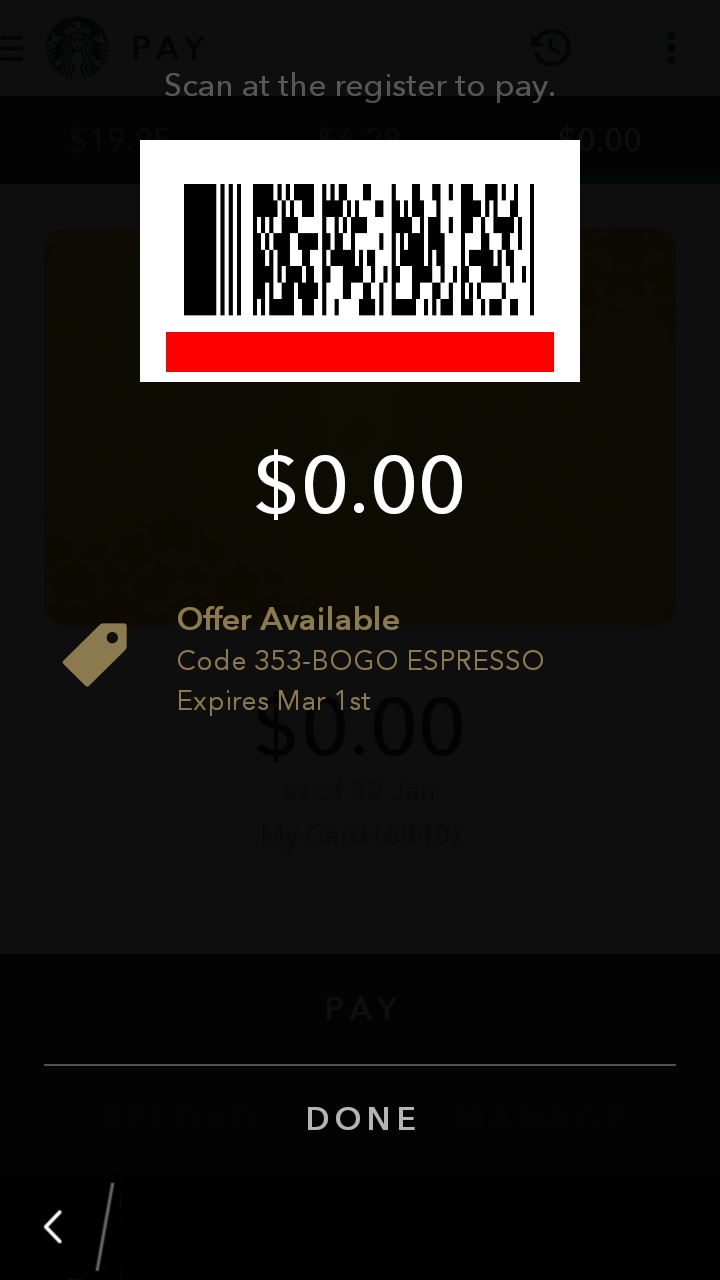
    Now I’m not a big coffee drinker, as a rule, but when I do indulge, it’s a flavoured coffee drink (I love mochas) from Starbucks.  I mainly drink tea and Starbucks has me covered there too.  I registered for a Starbucks card, mostly because I liked the idea of earning free drinks, and because I had a couple of instances of needing a caffeine hit but not having any cash on me and I hate to pay debit for a small transaction.  My big problem with the Starbucks card was forgetting it in my other wallet, or in the car. No it’s not a huge deal to walk back to the car to get my card, but when it’s minus 35 with windchill, it’s something I’d rather avoid.  I’d heard rumors of the Starbucks app working on BlackBerry 10 after an update, so I asked a friend who is a self admitted Starbucks addict. Yes, he’d tried it and it worked! He sent me the application file (I could have downloaded it for myself but he already had it so why bother?) and lo-and behold I had the Starbucks App.  I love this app because not only does it work as a payment card, but when you click “pay now” it pops up the bar code the Barista can scan along with any special offers.  I love that it brings up the offers because I can never remember if there is one on, when it expires, and if I’ve used it.  Remembering stuff like that is why I need caffeine!  The other thing that the app helps me remember is when I get my next free drink.  As much as I like being surprised with the fact that I’m eligible to redeem my stars, I like being able to plan ahead. Plus this is on my BlackBerry.  I may forget my wallet in the car, but I’m not going to forget my BlackBerry!  Win-Win.

    A screenshot showing the payment barcode and a 0.00 balance on the starbucks app. There is a notice that there is an offer available just below the balance!
    The payment screen. I love the offer available post at the bottom!

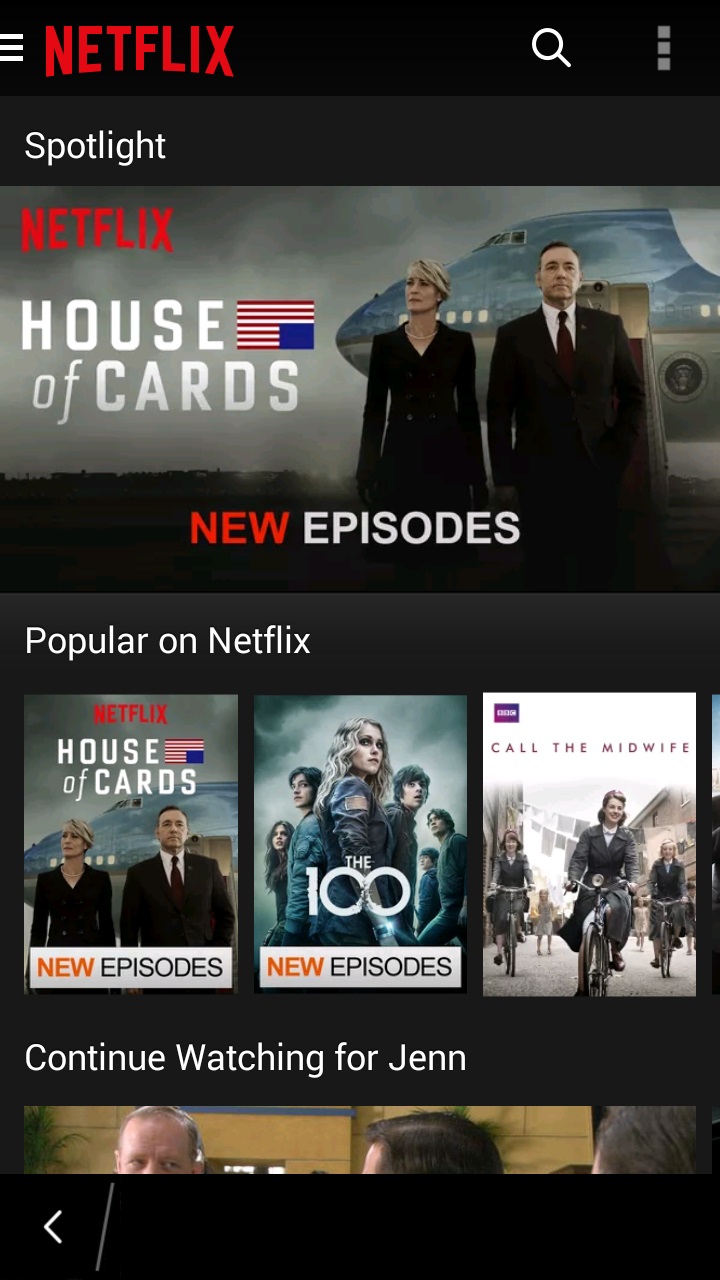
    The final app isn’t strictly necessary but it does make my phone into a super-powered entertainment machine.  The Z30 has a high definition screen and though it’s not huge, it’s not bad for watching video.  I’ve been dealing with insomnia lately and while reading helps, I find that it can wake me up more and sometimes a TV show is just what I need to put the worries out of my head and fall back asleep.  Enter the Netflix app.  I downloaded it, signed in , picked my profile, and voila – my Netflix Library is in the palm of my hand.  While there are some shows I wait to watch on the big screen TV (House of Cards season 3 anyone?), there are plenty of shows that are great viewing late at night.  I watch early seasons of Bones, favourite Doctor Who episodes, and Murdoch Mysteries all from the comfort of my bed.  (Yes I know sleep hygeine says no phones in the bedroom – I bring it in when I can’t sleep – that way if I fall asleep while watching a show, it’s on my bed and not on the couch where I’ll wake up with a sore neck in the morning.) The Netflix app is easy to navigate and keeps the settings (like the picture quality) the same as on your main device.  I also like the fact that you can choose the “Stream over wifi only” setting. This helps to prevent data overage charges, which is always good.

    Screenshot of the netflix app with House of Cards as the banner image and the popular on netflix category immediately beneath it
    The menus on the Netflix app are easy to navigate.

    So those are the three Android applications I have on my BlackBerry.  How many Android apps do you have on your BB10 device?  Are you a purist and have none or did you download Candy Crush the minute you could install Android applications?

  • I’ve been Bobbed!

    I’ve been Bobbed!

    Once in awhile the universe surprises you with something so wonderful, there are no words for it. Then again, I make my living with words so I’m going to find them. I belong to some fantastic groups on BlackBerry Messenger (BBM).  One of them, Team Z30 is a group of people from around the world who chat about pretty much everything. Yes, we are all using BlackBerry devices but we talk about our regular lives as often as we do about devices and upgrades and technological stuff. The members of the group have become like family to me – I worry about them when they’re going through stuff, I enjoy hearing how their day is going, and occasionally, I want to give some of them a good swift kick in the rear.

    The group was named Team Z30 because at the time of its creation, the Z30 was the newest BlackBerry 10 smartphone out there and it was one we all had. As newer BlackBerry 10 phones have been introduced, some members of the group have upgraded to either the Passport or the Classic. As a member of BlackBerry Elite, I get a device upgrade every year. I got the Z30 in late March 2014 which gives me my next device in the next few months. However, a lot of my friends have been asking what I think of the Passport and Classic devices. Having only used them for an hour or so each, I didn’t feel qualified to offer more than a basic opinion on them. I had mentioned this frustration in the group and asked members to let me know what they thought of the new devices so that I could pass on real user opinions to my friends and colleagues who wanted more than just a sales pitch.

    In February, BlackBerry Elites had a promotional code for the shop Blackberry website that gave customers $100 US or $125 Canadian off of a BlackBerry Passport in any colour. I shared the availability of the discount with the group members (and all my BBM contacts) and a number of group members took advantage of the savings to upgrade or get a second device. I love helping people get new BlackBerrys to fall in love with. It didn’t make sense for me to order a new one when times are a bit tight financially and my Z30 is working perfectly fine, so I lived vicariously through my friends who were getting new devices and posting lots of pictures of the unboxing.

    A few weeks ago, one of the members of the group messaged me to say that she had a screen protector for my phone and that she would like to send it to me. I was flabbergasted that someone I hadn’t met in person would do such a thing, but then I remembered that I’ve sent along chargers and cases for phones to people I’ve only known virtually. I sent along my address and waited.

    Then I waited some more. It seems that the Canadian Border Services Agency decided to keep my package for a few days. Then it meandered around Ontario for a few more days. Then, on the 20th, the sender got a message that there had been an attempted delivery and the package was being held at the post office. Except that I’d been home all day and had gone to the superbox at the end of the subdivision and there was no notice or anything else from Canada Post. Strange, but I decided to give it until Tuesday to start raising heck as I’m on a rural route and sometimes my mail takes a bit longer to get from the sorting depot. Tuesday dad was heading out for a business lunch so I asked him to check the mailbox for a slip or a package and let me know. He called to tell me that there was a package being held at the Post office for $55 in “fees”. $55 for a screen protector? That seemed a little rich, even for customs and brokerage fees (and taxes – there are always taxes). So I BBMed my friend. I asked if there was something I should know since I needed to pay a $55 hostage fee for the package. My friend didn’t want to spoil the surprise, but realized that the lovely people at Canada Post had tied her hands. So she told me.

    It wasn’t just a screen protector in the box. It was a new screen for the screen protector to go on – in the form of a BlackBerry Classic! She was quick to tell me that the phone wasn’t from her, it was from an anonymous source who wished to be identified only as Bob.

    Here is the note that accompanied the package: (I am so jealous of the handwriting!)

    %{include image.html url=“/wp-content/uploads/2015/03/img_20150302_141743_edit.jpg” alt=“A handwritten note that says Dear Jenn, You’ve been Bobbed. PS this gift is not from me” description=“It’s a mystery”}

    There was a lot of screaming going on in the family room as I grabbed the heavy duty scissors and went at the multiple rounds of packing tape. I carefully cut off the customs paperwork and put it in a file (I keep stuff like that just in case), then I ripped into the box with abandon. Not only was there a nice new (at least to me), Classic but also a skin and an official BlackBerry pocket to put it in. There was also the screen protector that started the whole adventure, and a piece of delicious chocolate. My day, month, year, have been made.

    %{include image.html url=“/wp-content/uploads/2015/03/img_20150224_153841_edit2.jpg” alt=“A BlackBerry Classic, with 2 different cases, a screen protector, and a small chocolate” description=“So much goodness in one package”}

    So to “Bob”, I’d like to say Thank You. When I get my next upgrade, one of my devices (either the Z30 or the Classic) will be passed on in a similar manner to continue the circle. Your generousity touched me and came at a time when I was feeling low. Knowing somebody cares – makes all the difference. Yet another reason why I am a proud member of #TeamBlackBerry