Tag: Android

  • Android Applications on my Z30

    Android Applications on my Z30

    I admit to being a purist. I prefer native apps to Android ports. Built for BlackBerry apps give me the best user experience on my Z30, but apps that have been ported into BlackBerry world are a close second.  Android apps? I was reluctant to use them at first, worried about battery drain or security loopholes, but I’ve mellowed out a bit with time. As a rule, I don’t download an Android app if there is a BlackBerry version available. I have the Amazon app store installed on my phone, and it’s pretty nice, if rarely used.  There are, however, three Android apps that I am unwilling to live without:  Waze, the Starbucks app, and Netflix.

    “But wait” you say, Waze is in BlackBerry world.  Technically that’s true but the version of Waze available in Blackberry World is outdated, full of bugs, and kept crashing on me.  I got so sick of having to change the distance units to kilometres from miles every time I opened the app that I wasn’t using it.  Which is unfortunate because Waze is an awesome app for people who drive.  With Waze you can enter your desitination, choose from 3 different routes, and go.  You can also add a stop – say if your gas light comes on while you’re taking a new route home and you have no clue where the nearest gas station is.  Not that it’s ever happened to me. Okay maybe once or twice.  (Note: I always pull over before using Waze or adding a stop, though with the BlackBerry Assistant that may change since I have voice command over applications).  I wrote a post extolling the virtues of BlackBerry Traffic on my Bold 9900, and when I got my Z10, I gamely tried to use its replacement: Blackberry Maps.  Blackberry Maps is functional if you’re trying to get from point A to point B via the most common route.  The problem is that it doesn’t take traffic into account or road closures.  Driving into Toronto for the past few years, I’ve needed something that can help me avoid the numerous construction closures on the highways leading into and out of the city.  Enter Waze.  More than once, Waze has alerted me to heavy congestion on the road ahead and offered up an alternate route to avoid it.  It even saved Dad and I from parking on highway 400 coming down from the cottage.  (Dad wasn’t sure about the off road journey Waze proposed but gamely tried it and we were cruising at a steady 60 km / hr on backroads while the radio reports had the 400 at a standstill.) Waze plays through the bluetooth connection to my car audio system or through the speakers on my phone.  Either way I get turn by turn directions to my destination – directions which, as a bonus, are in enough time to change lanes without panic.  One of the neat things about waze as a passenger, is that I can report traffic jams, accidents and other issues to help my fellow drivers.  It’s a really easy to use interface too, which is a necessity in a GPS app.
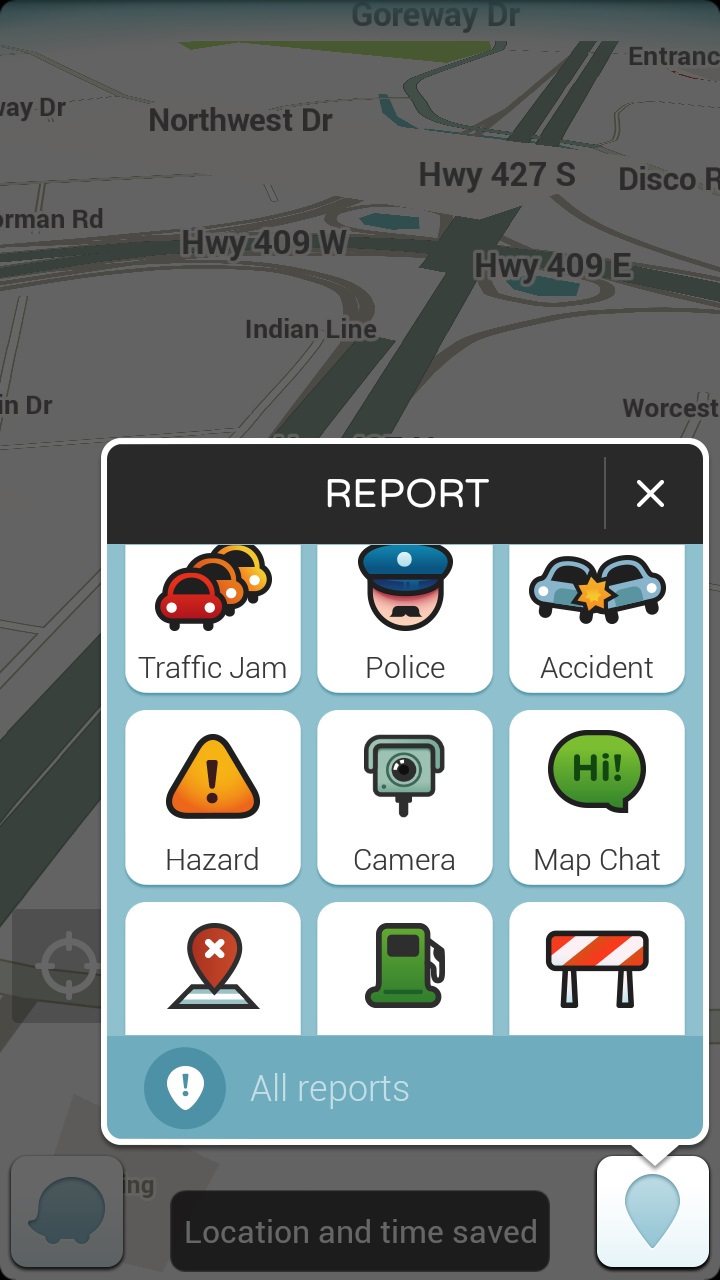
    A map interface with the report function highlighted there are 9 options in a 3x3 grid: traffic jam, police, accident, hazard, camera, map chat, map issue, gas prices, closure
    The easy reporting interface on Waze

    Now I’m not a big coffee drinker, as a rule, but when I do indulge, it’s a flavoured coffee drink (I love mochas) from Starbucks.  I mainly drink tea and Starbucks has me covered there too.  I registered for a Starbucks card, mostly because I liked the idea of earning free drinks, and because I had a couple of instances of needing a caffeine hit but not having any cash on me and I hate to pay debit for a small transaction.  My big problem with the Starbucks card was forgetting it in my other wallet, or in the car. No it’s not a huge deal to walk back to the car to get my card, but when it’s minus 35 with windchill, it’s something I’d rather avoid.  I’d heard rumors of the Starbucks app working on BlackBerry 10 after an update, so I asked a friend who is a self admitted Starbucks addict. Yes, he’d tried it and it worked! He sent me the application file (I could have downloaded it for myself but he already had it so why bother?) and lo-and behold I had the Starbucks App.  I love this app because not only does it work as a payment card, but when you click “pay now” it pops up the bar code the Barista can scan along with any special offers.  I love that it brings up the offers because I can never remember if there is one on, when it expires, and if I’ve used it.  Remembering stuff like that is why I need caffeine!  The other thing that the app helps me remember is when I get my next free drink.  As much as I like being surprised with the fact that I’m eligible to redeem my stars, I like being able to plan ahead. Plus this is on my BlackBerry.  I may forget my wallet in the car, but I’m not going to forget my BlackBerry!  Win-Win.
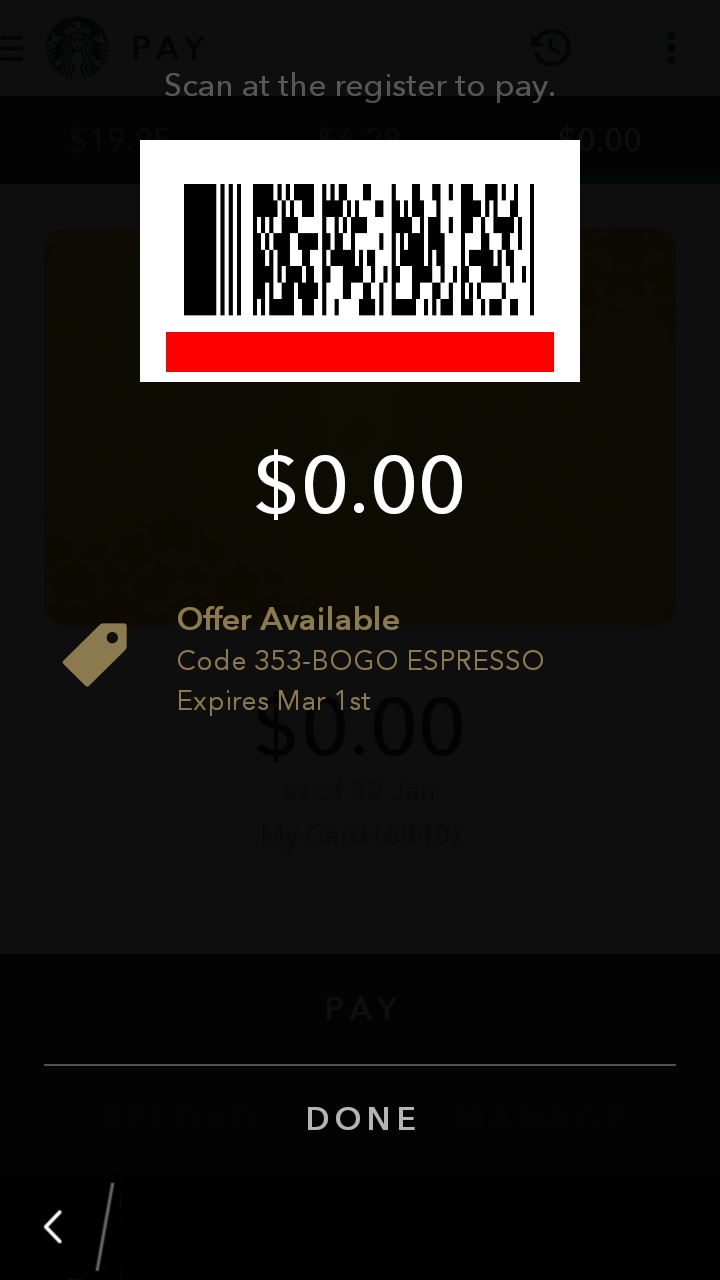
    A screenshot showing the payment barcode and a 0.00 balance on the starbucks app. There is a notice that there is an offer available just below the balance!
    The payment screen. I love the offer available post at the bottom!

    The final app isn’t strictly necessary but it does make my phone into a super-powered entertainment machine.  The Z30 has a high definition screen and though it’s not huge, it’s not bad for watching video.  I’ve been dealing with insomnia lately and while reading helps, I find that it can wake me up more and sometimes a TV show is just what I need to put the worries out of my head and fall back asleep.  Enter the Netflix app.  I downloaded it, signed in , picked my profile, and voila – my Netflix Library is in the palm of my hand.  While there are some shows I wait to watch on the big screen TV (House of Cards season 3 anyone?), there are plenty of shows that are great viewing late at night.  I watch early seasons of Bones, favourite Doctor Who episodes, and Murdoch Mysteries all from the comfort of my bed.  (Yes I know sleep hygeine says no phones in the bedroom – I bring it in when I can’t sleep – that way if I fall asleep while watching a show, it’s on my bed and not on the couch where I’ll wake up with a sore neck in the morning.) The Netflix app is easy to navigate and keeps the settings (like the picture quality) the same as on your main device.  I also like the fact that you can choose the “Stream over wifi only” setting. This helps to prevent data overage charges, which is always good.
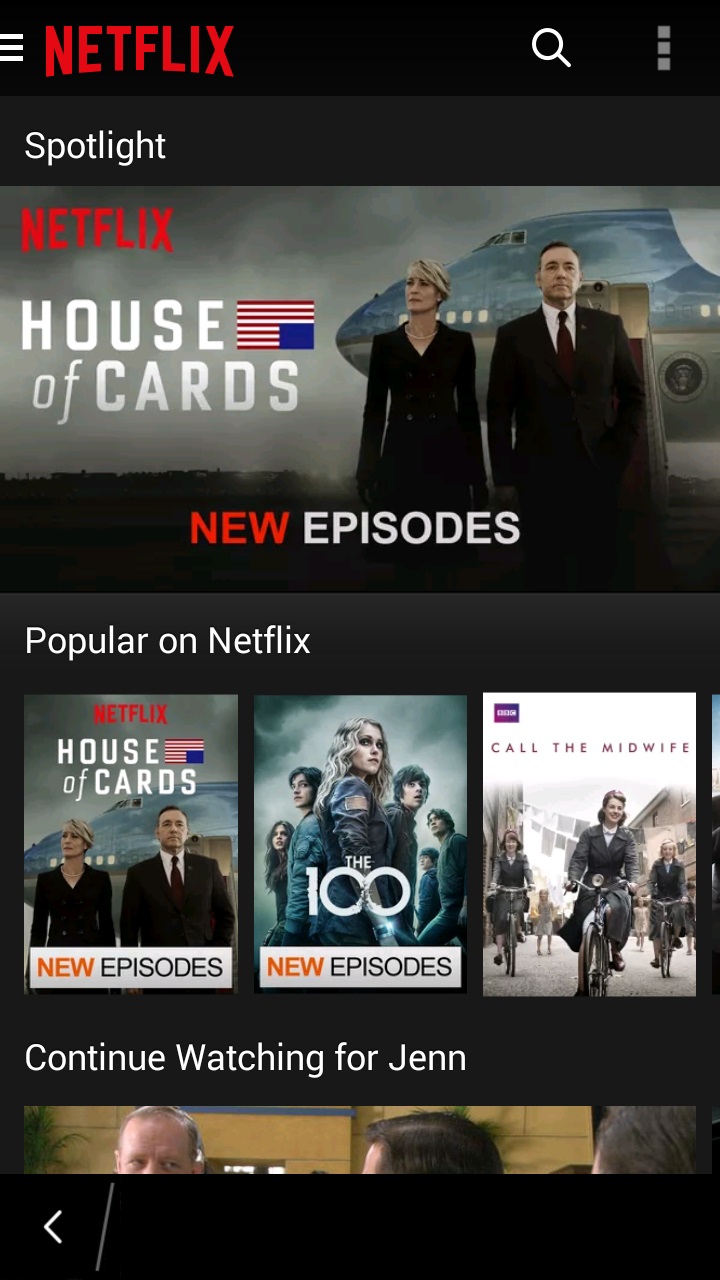
    Screenshot of the netflix app with House of Cards as the banner image and the popular on netflix category immediately beneath it
    The menus on the Netflix app are easy to navigate.

    So those are the three Android applications I have on my BlackBerry.  How many Android apps do you have on your BB10 device?  Are you a purist and have none or did you download Candy Crush the minute you could install Android applications?
  • Thank You

    Thank You

    I think as a society we focus too much on the negative and not enough on the positive.  This applies to BlackBerry too.  We are all too eager to jump all over the company for a perceived misstep but rarely do we stand back and thank the company and their employees for all of their hard work and dedication to the principles that make BlackBerry the great company that it is.

    Today BlackBerry rolled out Channels for BlackBerry Messenger.  BlackBerry could have done what other companies have done and said “screw legacy users, if they want Channels, they should upgrade to a newer device”.  The fact that they didn’t says a lot about the corporate culture at BlackBerry.  Instead of releasing Channels for the new, flashy BB10 operating system and leaving legacy device users hanging, BlackBerry employees working on channels worked long days, nights, and even weekends in order to roll out Channels to everyone at the same time. To me that says that BlackBerry values all of its customers and wants to bring them all the best experience.  Yes there was an error in the app world description of channels where it said that OS 10.2 (which at this time is still unavailable from US carriers) was required to load the Channels instead of requiring BBM 10.2.  To their credit, within 20 minutes of learning of the problem, the problem was fixed.   No company is perfect, mistakes will be made, but the speed with which the mistake was corrected shows that Blackberry cares about their customers.  Would BlackBerry like everyone to upgrade to the newest devices?  Of course they would.  (If you’re reading this and are on the fence about upgrading to BlackBerry 10 – do it!  It’s an amazing operating system with both touchscreen and keyboard models.) But BlackBerry also respects their customer base enough to realize that not everyone can afford to upgrade, and that even those who haven’t upgraded to a new device or operating system deserve the best possible mobile computing experience.  For that I give a heartfelt thank you.

    Thank you BlackBerry for caring about all of your customers and for providing user experience that shows that your customers are more than just faceless sources of revenue. The next time someone questions my loyalty to BlackBerry, I will direct them to this post.

  • Blaq for BlackBerry 10

    Blaq for BlackBerry 10

    When I said that I would blog about Blaq later, I didn’t think it would be later today.  I am at BlackBerry Live in Orlando next week and I’m not bringing my laptop so I figured I should probably write the review sooner rather than later.

    From day 1 with my Z10, I was frustrated by the native Twitter client (Twitter for BlackBerry).  I realize that it is as functional as Twitter for Android and Twitter for iOS, but I’ve been spoiled with Twitter for BlackBerry 7.  I expected the Twitter client on the BlackBerry 10 devices to be just as functional, and when it wasn’t I was disappointed. I tried a number of other Twitter clients in the first two months I had my Z10: Tweetings, Neatly, RewitQ, and Twitter for BlackBerry 10.  Each of them had some advantages but they were either too slow, too frustrating to use, or missing key features (like lists).

    As many of you know, I’m a Twitter junkie.  I need a fairly robust application to use on a daily basis.  One of my favourite features on Twitter is the ability to sort your followers into lists and follow those lists.  I follow over 1600 people on twitter, and, though I do Twitter purges on a regular basis where I unfollow accounts that are no longer relevant to me, it can still be a lot to handle.  Lists allow me sort the people I follow into groups such as “Formula 1 fans”, “CFL” , and “Journalists” and only follow those streams when I’m feeling overwhelmed.  For example, Monday May 6th was the CFL draft and though I love all my tweeps, I was trying to keep up with the draft picks as they happened.  I opened Twitter on my laptop, went to lists, and selected my football list.  Everything else in my stream disappeared and I could pretend that the world outside of football had melted away for awhile. None of the apps I had on my Z10 before Blaq allowed me to follow lists easily.

    Aside from Lists, the other features that I want in a Twitter application are, in order of importance to me:

    • Multiple Account Support (preferably 3)
    • The ability to quote Tweets when retweeting
    • The ability to Mute hashtags (Sometimes, I just don’t want to hear about #PeopleIWantToPunch)
    • Real time refresh rate.

    It’s not a huge or particularly demanding list, yet until Blaq was released no single Twitter application for BlackBerry 10 had all the features I wanted.  Right now Blaq only allows you to have 2 accounts but I’ve heard that support for 3 is coming and I still have the other applications so the accounts I use less frequently are set up on those.

    Blaq is relatively easy to use.  When you first download it, you need to authorize it to access your twitter account, this is pretty standard. Once you’ve done this the screen will pull in your account and change to the main screen.  The main screen looks like this:

    %{include image.html url=“/wp-content/uploads/2013/05/img_00000446.png” alt=“The feed fro the Blaq Twitter App with user profile pictures and their tweets beside them in a simple list format, There is a green bar at the top of the list that is 90% full” description=“Blaq for BlackBerry 10”}

    The green bar at the top is called the timeline progress bar and fills up as you get closer to the newest tweets in your stream.  The clock on the green bar shows the time of the tweet you’re on while the clock in the top right shows the current time.

    From the main screen, it takes a quick swipe to navigate within the app.  Swiping right gets you the most options:

    %{include image.html url=“/wp-content/uploads/2013/05/blaq.png” alt=“The full view of the Blaq app with the sidebar showing there are 10 icons down the side each with a number.” description=“Blaq has lots of options”}

    To make it easier to understand what each of these options are, I’ve numbered them.

    1. Mute:  Allows you to mute a person or a hashtag.  This can be helpful if there is a twitter party going on and you’re not participating. Selecting this option and then “add mute” on the next screen brings up a page where you can enter your criteria for what you want muted. You can also un-mute from this screen.
    2. Search: Lets you search Twitter for a username or hashtag. Blaq imports saved searches but you can delete them at any time.
    3. Me: takes you to your profile page.  You can see your followers, who is following you, how many tweets you’ve tweeted, and lots of other fun stuff.
    4. Favourites: When you favourite a tweet, they are marked  with a star.  You can find them again later by selecting this option.
    5. Lists – All of your twitter lists are here.  Currently, you can’t edit lists from Blaq but if that changes, I will let you know!
    6. Retweets – These are tweets of yours that have been retweeted.
    7. Direct Messages – you can read and compose direct messages from here.
    8. Mentions – these are all of your @ replies.
    9. Home – this takes you back to your whole twitter feed.
    10. Compose – Tap this to compose a new tweet.

    When you swipe down from the top of the screen, you get a much smaller menu: Accounts lets you add another account or switch between accounts, while Settings allows you to change the font size, set the refresh rate while the app is inactive, and access the tutorial again by selecting Help.

    %{include image.html url=“/wp-content/uploads/2013/05/img_00000453.png” alt=“the BlackBerry 10 Blaq app showing the twitter feed, green progress bar, with a menu showing accounts and settings at the very top.” description=“This menu is pretty easy to navigate”}

    Finally, swiping left allows you to access options directly related to the tweet you are viewing.  This is the action that is the least intuitive in Blaq.  To access this menu, touch a tweet and then pull left.  While holding the menu open, pull the list up or down to access the different options.

    %{include image.html url=“/wp-content/uploads/2013/05/img_00000456.png” alt=“The BlackBerry 10 Blaq app with the twitter feed and green progress bar showing, pulled to the left to show a menu with 4 options” description=“Final menu”}

    1. Allows you to reply to the tweet.
    2. Allows you to retweet the tweet to your followers.  (By default the app will confirm that this is an action you want to do)
    3. Marks the tweet as a favourite (again, the default is set to confirm that you want to favourite the tweet)
    4. Options.  If the tweet is one that you sent, you can delete it from here.

    Earlier, I mentioned that one of my “must have” features in a twitter app is the ability to quote tweets.  You need to select the tweet by tapping it so that it opens up in its own screen.  When the tweet is isolated, touch and hold the retweet button (Circled in red below), and select the Middle option “Quote Retweet”.

    %{include image.html url=“/wp-content/uploads/2013/05/img_00000461.png” alt=“The profile page for the BlackBerry Help Twitter account shown in the Blaq app with the 2nd of 4 menu options, a broken rectangle circled in red.” description=“The Quote Retweet Button”}

    Touching and holding the retweet button brings up 3 menus on the right:

    1. Classic retweet – a nice and simple way to retweet
    2. Quote – puts the item you are retweeting in quotes – useful if you’re going to modify the tweet in any way.
    3. Retweet via – a type of retweet I’m beginning to use a lot more often – great for websites – takes the text of the tweet and then at the end puts (via @username).  It’s a stylistic choice but one that I quite enjoy.

    One last thing about Blaq.  By default, Blaq connects itself to BlackBerry Messenger (BBM). You get an option on every tweet and retweet to send the message as your BBM status or share it with BBM contacts.  I don’t like that option, and so I turned it off.  To do this is a little tricky though.  You need to go to the Settings menu on your BlackBerry (it looks like a cog) –> Security and Privacy –>Application Permissions –>Blaq and switch “Connect to BBM” to off.

    In a nutshell, that’s Blaq for BlackBerry 10.  Have you tried Blaq for BlackBerry 10 yet?  What do you think of it?

  • She’s Connected and my BlackBerry

    She’s Connected and my BlackBerry

    You know what I absolutely love hearing when showing off my Bold 9900?  “Wow, I didn’t know a BlackBerry could do THAT”.  I heard that a lot this weekend at the She’s Connected Conference in Toronto.  Mostly it was the simple things like the fact that managing multiple accounts in the Native Twitter Application is so easy.  Or that I could remote control my PlayBook from my Bold 9900 (to be honest, that was me showing off because I had the bluetooth keyboard for the PlayBook and was perfectly capable of typing on that but I like the wow factor of the remote control).  I loved meeting so many fellow BlackBerry devotees and being able to help them use their devices more easily.  It’s not rocket science but there are tips and tricks that will enhance your experience as a member of Team BlackBerry.

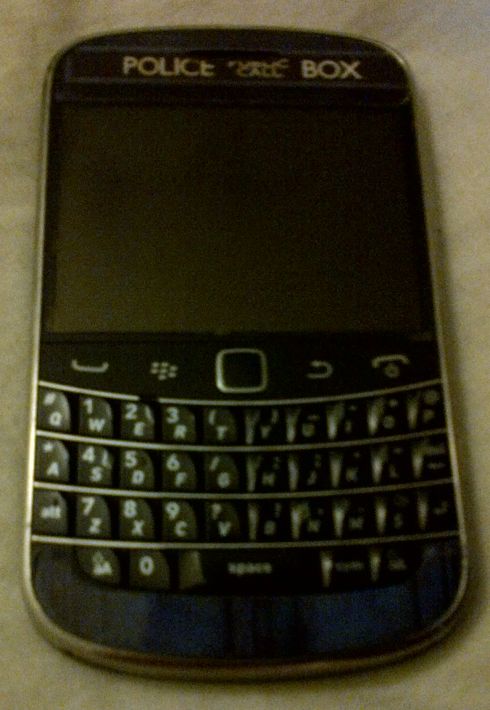
    A BlackBerry Bold 9900 with a sticker on it that makes it look like the TARDIS from Doctor Who - a blue police box
    My BlackBerry Bold 9900

    The one question everyone seemed to ask me was if I was excited about the upcoming release of the BlackBerry 10 devices and operating system.  The answer to that was an unequivocal YES!  I am very excited about BlackBerry 10 and can’t wait until it is released!  I still don’t know how I’m going to get a BlackBerry 10 device into my hot little hands but rest assured, it will be done.  I have friends who are developers for BlackBerry and their excitement at what the BB10 OS can do has rubbed off on me.    I truly believe that there is a core market of BlackBerry users who may have switched to another platform who are waiting for an excuse to come back to the BlackBerry fold.  I believe that the BlackBerry 10 Operating System will be the thing to bring them back.  I spoke to quite a few people who either had been BlackBerry users in the past or who were simply curious about the new product launch.  A number of them were at the end of their cell phone contracts and were eligible for a new device, either now or at the beginning of the year.  After chatting with me, many of them are waiting to see what BlackBerry 10 has to offer before deciding what phone to get. I wasn’t out to strong arm people into becoming members of Team BlackBerry but I wanted people to give it a chance.

    BlackBerry isn’t for everyone.  If you want a smartphone to game on, then this isn’t the right solution for you.  However, if you want your phone to work FOR you, and WITH you then you need to consider BlackBerry.  I primarily use my BlackBerry for social media, emails, as a gps, as a camera, and *gasp* to make and receive phone calls  Yes I have a number of very entertaining apps and games, but they’re not the reason I chose my BlackBerry.  I have far more games on my 64 gb PlayBook.

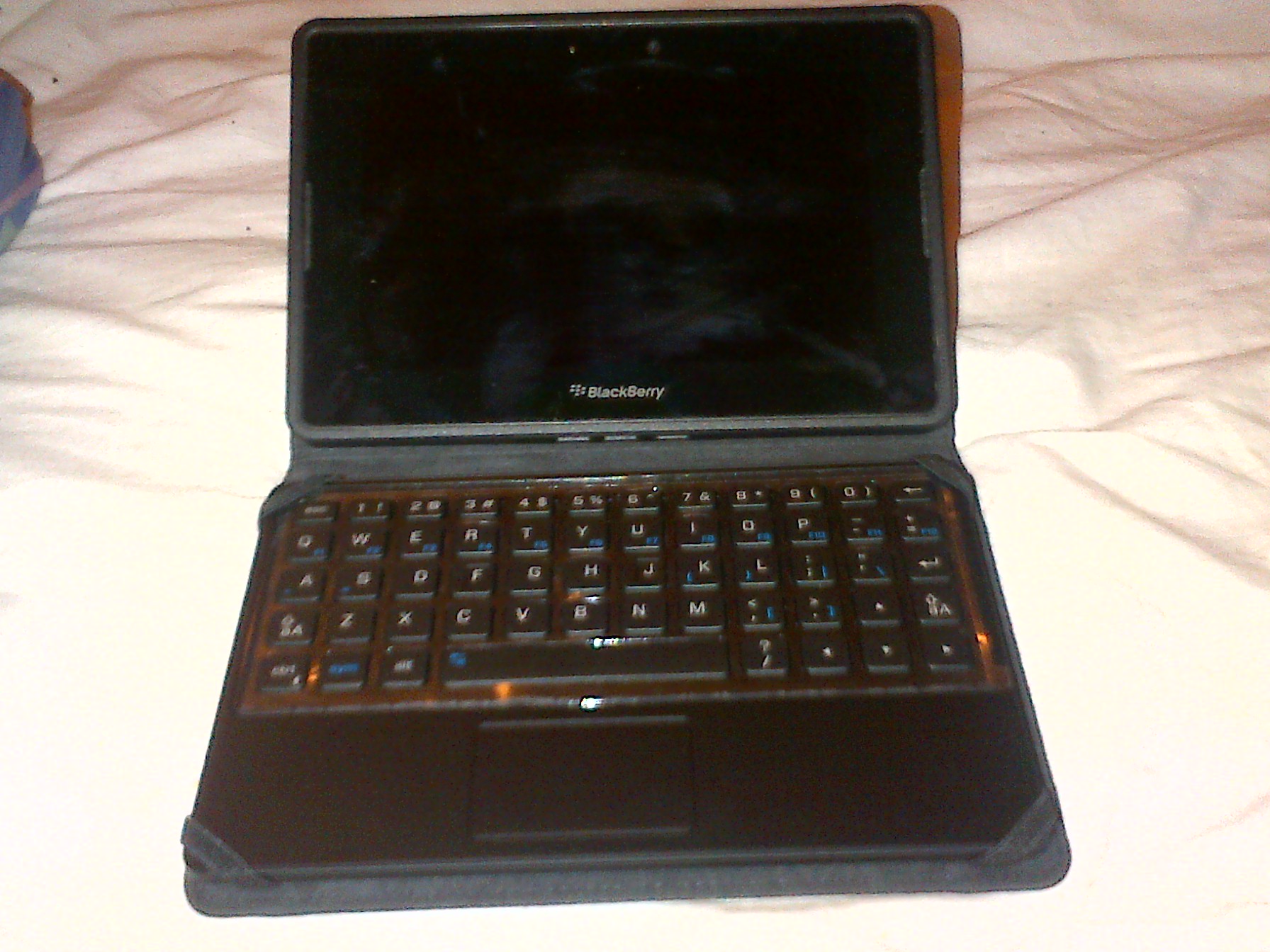
    BlackBerry PlayBook, small rectangular tablet in a case with a full keyboard
    My PlayBook

    Not once all conference did i wish I had a different phone.  My Bold 9900 had no issues connecting to the wifi, releasing the cached wifi info page so I could log in again on the second day, or with maintaining a battery charge throughout the conference.  I don’t want to have to carry around a charger for my phone because it won’t last 10 hours.  I was having too much fun trying to meet up with twitter friends to be hunting for somewhere to plug in my phone.

  • Why my loyalty isn’t going anywhere

    Why my loyalty isn’t going anywhere

    In case you couldn’t tell from the title of my blog, I’m a BlackBerry fan.  I have tried iphones and Androids and while they were a lot of fun, my infatuation usually only lasted a month or two.  I’ve had my Bold 9900 for a year now.  A year of bad press for Research In Motion and of people constantly asking me why I would want to jump on board a sinking ship.  The answer is simple: I don’t believe that the ship is sinking.  I LOVE the functionality of my BlackBerry Bold 9900 and am very excited by what I’ve been hearing about BlackBerry 10.  My Bold 9900 allows me to work from the dock, at a football game, or from my bedroom.  Documents To Go allows me to edit word and excel documents from my BlackBerry without turning on my laptop or PlayBook.  BlackBerry Messenger (which despite some comments I’ve heard on Twitter is not going anywhere) helps me keep in touch with friends and family.

    I have a bunch of amazing apps on my BlackBerry Bold 9900 and on my PlayBook.  To all those who say that BlackBerry doesn’t have a wide selection of apps, I ask: Have you been to App World lately?  The app that I fell in love with  most recently is BlackBerry Traffic.  I drive into Toronto a few times a month, and there’s nothing I like less than being stuck in traffic because I don’t know the alternate routes.  Now I have an app that not only gives me my ETA based on current traffic conditions but it also gives me an alternate route in case I can’t take the traffic jams anymore.  How awesome is that?  The app gives you turn by turn directions either through your bluetooth headset or through the speaker on the BlackBerry.  You can even set it up to go through your car’s audio system (though I haven’t done this yet).    I learned about this awesome app from my friend Nick who used it to get us to the Canadian National Exhibition on Sunday despite some fairly major construction on the 401.  Yes we still ended up stuck in traffic but we knew how long we would be in that traffic and that (surprise!) there wasn’t any traffic turning into the underground parking at the Direct Energy Centre.
    The app is updated in real time by other users who are also running it.  So if I leave from the cottage 30 minutes ahead of Dad and we’re both running it, he gets updated if I slow down for an extended period of time.

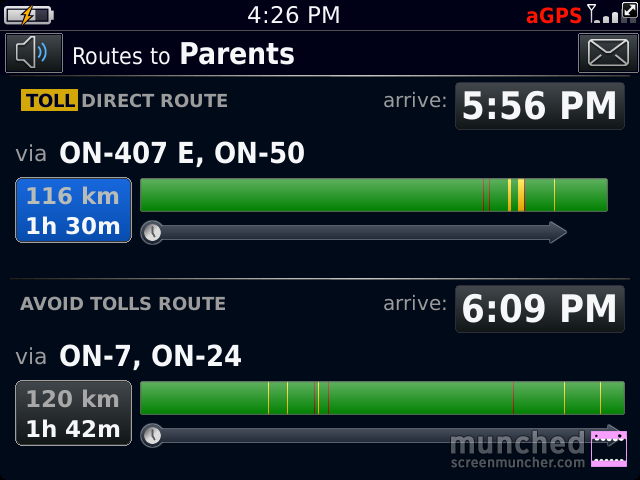
    If I’m going home to visit my parents, I have a plethora of routes I can choose from.  BlackBerry Traffic makes it easy to pick the right one.  I simply select my destination and choose the route that’s quickest.

    The BlackBerry Traffic app screen with the words Routes to Parents at the top and 2 different routes below, one with tolls and one avoiding tolls.
    The choice screen.

    In this case I’d pick the 2nd one because it doesn’t take me on the 407. The green sections indicate good traffic flow, the yellow indicates slower than normal flow, and the red sections mean traffic is very slow.

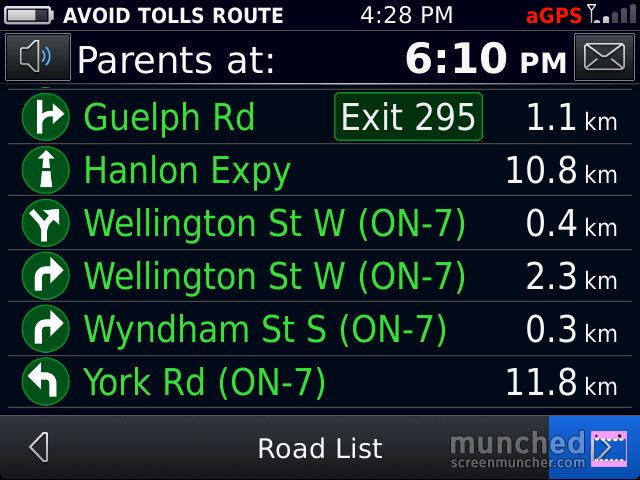
    You can click on a route and it will show you road by road how the traffic is:

    The BlackBerry Traffic directions screen with all of the roads in green, indicating no delays on the route. The top of the screen says Parents at 6:03pm (the ETA), the time on the phone is 4:28
    All Green!

    I’m going to test this app out more thoroughly over the Labour Day weekend when I’ll be doing a lot of driving, some of it to very unfamiliar places.  So far it’s the best traffic app I’ve seen for ANY device.

  • A word of Introduction

    A word of Introduction

    TardisBerry
    My Beloved Bold 9900 – as a TARDIS !

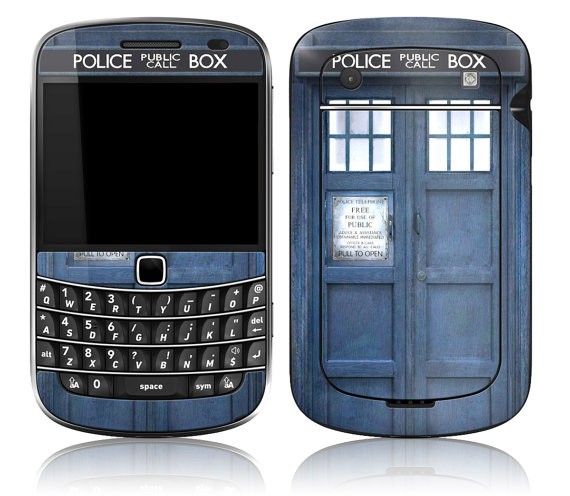
    Welcome to my new blog.  People keep asking me why I’m so devoted to my BlackBerry (both the Bold 9900 and my 64gb Playbook) so I’m starting this blog to try and explain.  It’s not just that I live in the Kitchener-Waterloo area and have had more exposure to the BlackBerry brand.  My dad has had a succession of BlackBerries, starting with the “Brick berry” going through the pearl (he was not a fan, nor was I) and after seeing my Bold 9900, he decided he needed the latest and greatest BlackBerry too.  I didn’t make my choice of phone lightly.  In the spirit of full disclosure I will say that I got my BlackBerry Bold 9900 free after winning a BlackBerry sponsored contest on Twitter.  Even so, if it wasn’t the right phone for me, I would have sold it and found something else.  I want a smart phone that is actually smart.  I don’t play many games (except cribbage and word mole – they’re surprisingly addictive) on my phone.  I use my phone to talk to people.  Whether it’s by BlackBerry Messenger (BBM), Text messages, Twitter, Facebook, or e-mail, my BlackBerry never lets me down.  I love the fact that it has a keyboard and a touchscreen – I can type much faster on the keyboard than I ever could on my IPhone, and I still get the fun of a touchscreen to flip between pictures quickly.  It’s the best of both worlds.  Oh, and the camera rocks.  I also found a skin on Etsy that made my BlackBerrry into a TARDIS from Doctor Who.  Yes, I geeked out my BlackBerry Bold.  

    Front and back views of a BlackBerry Bold 9900 with a skin on it that looks like the TARDIS from Doctor Who - a blue police call box.
    The TARDISBerry

    I’m a real person and I need a smartphone that allows me to communicate effectively.  For me, that’s my Bold 9900.