Tag: Bold 9900

  • Why my loyalty isn’t going anywhere

    Why my loyalty isn’t going anywhere

    In case you couldn’t tell from the title of my blog, I’m a BlackBerry fan.  I have tried iphones and Androids and while they were a lot of fun, my infatuation usually only lasted a month or two.  I’ve had my Bold 9900 for a year now.  A year of bad press for Research In Motion and of people constantly asking me why I would want to jump on board a sinking ship.  The answer is simple: I don’t believe that the ship is sinking.  I LOVE the functionality of my BlackBerry Bold 9900 and am very excited by what I’ve been hearing about BlackBerry 10.  My Bold 9900 allows me to work from the dock, at a football game, or from my bedroom.  Documents To Go allows me to edit word and excel documents from my BlackBerry without turning on my laptop or PlayBook.  BlackBerry Messenger (which despite some comments I’ve heard on Twitter is not going anywhere) helps me keep in touch with friends and family.

    I have a bunch of amazing apps on my BlackBerry Bold 9900 and on my PlayBook.  To all those who say that BlackBerry doesn’t have a wide selection of apps, I ask: Have you been to App World lately?  The app that I fell in love with  most recently is BlackBerry Traffic.  I drive into Toronto a few times a month, and there’s nothing I like less than being stuck in traffic because I don’t know the alternate routes.  Now I have an app that not only gives me my ETA based on current traffic conditions but it also gives me an alternate route in case I can’t take the traffic jams anymore.  How awesome is that?  The app gives you turn by turn directions either through your bluetooth headset or through the speaker on the BlackBerry.  You can even set it up to go through your car’s audio system (though I haven’t done this yet).    I learned about this awesome app from my friend Nick who used it to get us to the Canadian National Exhibition on Sunday despite some fairly major construction on the 401.  Yes we still ended up stuck in traffic but we knew how long we would be in that traffic and that (surprise!) there wasn’t any traffic turning into the underground parking at the Direct Energy Centre.
    The app is updated in real time by other users who are also running it.  So if I leave from the cottage 30 minutes ahead of Dad and we’re both running it, he gets updated if I slow down for an extended period of time.

    If I’m going home to visit my parents, I have a plethora of routes I can choose from.  BlackBerry Traffic makes it easy to pick the right one.  I simply select my destination and choose the route that’s quickest.
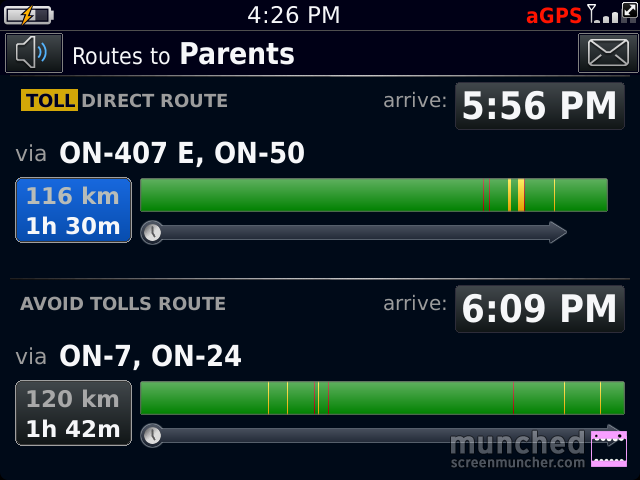
    The BlackBerry Traffic app screen with the words Routes to Parents at the top and 2 different routes below, one with tolls and one avoiding tolls.
    The choice screen.

    In this case I’d pick the 2nd one because it doesn’t take me on the 407. The green sections indicate good traffic flow, the yellow indicates slower than normal flow, and the red sections mean traffic is very slow.

    You can click on a route and it will show you road by road how the traffic is:
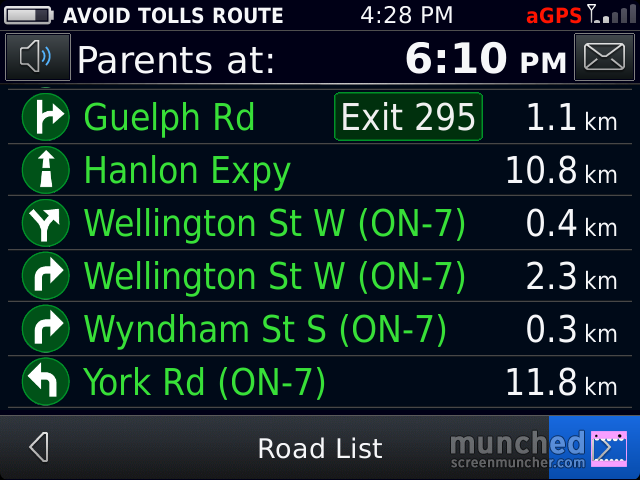
    The BlackBerry Traffic directions screen with all of the roads in green, indicating no delays on the route. The top of the screen says Parents at 6:03pm (the ETA), the time on the phone is 4:28
    All Green!

    I’m going to test this app out more thoroughly over the Labour Day weekend when I’ll be doing a lot of driving, some of it to very unfamiliar places.  So far it’s the best traffic app I’ve seen for ANY device.

  • The Camera Question Part II – PlayBook Edition

    The Camera Question Part II – PlayBook Edition

    One of the best features of my BlackBerry PlayBook is its portability.  I didn’t want a tablet I’d need a separate bag to lug around.  I wanted something truly portable.  With its 7 inch display, the PlayBook fits in my purse, meaning I can take it pretty much anywhere I go.  Case in Point – I went to the Honda Indy Toronto on July 6th.  The Toronto area Honda dealers all get together and sponsor the Friday at the Indy so that fans get onto the grounds and into the grandstands for free.  It’s an awesome promotion and a great way for people who wouldn’t be able to afford to go otherwise.  I was going primarily to watch a driver I’ve known for most of his life, James Hinchcliffe, race in the GoDaddy car.  The Indy Cars go in excess of 100 miles per hour so catching them on film isn’t easy.  I decided that instead of using a digital camera,  I would try to take pictures on my BlackBerry Bold 9900 and my PlayBook.

    %{include image.html url=“/wp-content/uploads/2012/07/img_00000037.jpg” alt=“a bright green Indycar turns around a corner on the racetrack at the Honda Indy Toronto with the red Honda bridge visible in the background of the shot” description=“James Hinchcliffe on Track”}

    That would be James on track at full speed.  I was surprised at just how good the camera on the playbook was at taking pictures of objects moving quickly!  The quality of the ones on my bold were just as good.  I love me a good camera.

  • Protect yourself and your smartphone with BlackBerry Protect

    Protect yourself and your smartphone with BlackBerry Protect

    BlackBerry Protect is one of the most useful tools available from BlackBerry app world.  Not only is BlackBerry Protect a convenient way to backup your data wirelessly (for those times when getting to a computer and backing up data the old fashioned way just isn’t convenient) but if your BlackBerry is lost or stolen, BlackBerry Protect can help you find it.

    BlackBerry Protect is not a substitution for backing up your data regularly, but it does mean that if something happens to your BlackBerry, your contacts. memos, text messages, calendar entries, browser bookmarks, password keeper entries and wi-fi profiles can be restored, either to the same device or to a new one.

    If you lose  your BlackBerry, or it is stolen, BlackBerry Protect can help you find it by showing you the location, making the device emit a noise, or display a custom message on the homescreen.  Furthermore if the device is stolen, you can lock the device, change the device password or delete all the data from the device.  The only downside is that you can’t use BlackBerry Protect on a device that is associated with the BlackBerry Enterprise Server.

    Pretty awesome eh?  I’m sure you want to get BlackBerry Protect up and running as soon as possible on your BlackBerry.  Here’s how to do it.

    On BlackBerry 7 OS devices, BlackBerry Protect is already in your applications folder.  If it isn’t there or if you’re not running a BB7 device, you can download it free from BlackBerry App world.  Click on the BlackBerry Protect icon.

    %{include image.html url=“/wp-content/uploads/2012/06/munch_2012_06_28_021609.png” alt=“Screenshot of the BlackBerry home screen with 3 rows of app icons visible. There is a gold shield with the BlackBerry Logo in the bottom row that is circled in red and labelled with BlackBerry Protect Icon” description=“BlackBerry Protect”}

    You will have to agree to the license terms, and enter your BlackBerry ID and follow the instructions on screen.  Once you set up BlackBerry Protect, you will automatically do your first backup.  After your first backup, when you go into the BlackeBerry Protect app, this is the screen you will see:

    %{include image.html url=“/wp-content/uploads/2012/06/bbprotecthome1.png” alt=“The BlackBerry Protect Home screen with the words BlackBerry Protect at the top, filled in fields for the BlackBerry ID which is blacked out, Last backup date, status, next backup, and checkboxes for only back up over wifi and allow backup when roming both unchecked. There are icons at the bottom with a file folder with a green arrow pointing out circled and labelled as manual backup, a file folder with a blue arrow pointing in circled and labelled as restire from backup and a grey envelope icon that is not circled” description=“Home screen of BlackBerry Protect”}

    You can choose to only back up over wifi, or to be able to back up while roaming.  You can also do a manual backup by clicking on the button at the lower left of the screen, or restore from backup using the middle button.  The right button gives you access to the BlackBerry protect message centre.

    If you press the BlackBerry button on this screen and select “Options” you can set up BlackBerry protect to suit your needs.

    %{include image.html url=“/wp-content/uploads/2012/06/munch_2012_06_28_023128.png” alt=“BlackBerry Protect Options Screen with the words Application options at the top.There is a checkbox beside Prevent delete of BlackBerry Protect which is checked. Below the Application options are backup options with Automatically Back up checked. The Backup Frequency dropdown is set to daily, and Only back up over wifi and allow backup while roaming are unchecked.” description=“The Options screen”}

    I suggest keeping the ’Prevent Delete of BlackBerry Protect” on.  The frequency of backups is really a matter of personal choice – as is what data you want to back up.  I am somewhat paranoid so I back everything up daily.

    At the bottom of the screen, you can choose if you want your device’s location to be viewable from the BlackBerry Protect website.  I suggest keeping this box checked as well.  Hopefully you will never need to use it but it’s good to know it’s available if needed.

    %{include image.html url=“/wp-content/uploads/2012/06/munch_2012_06_28_030001.png” alt=“More settings on the BlackBerry Protect App. The box for Location Reporting has a check beside I want this device’s to be visible from the BlackBerry Protect Website which is checked.” description=“This setting can help you find your device if lost or stolen”}

    BlackBerry Protect is one of the best kept secrets of the BlackBerry world – spread the news and help other members of Team BlackBerry protect themselves!

  • Identify yourself with the BlackBerry ID

    Identify yourself with the BlackBerry ID

    BlackBerry ID falls into the category of things your really need to do first on your BlackBerry.  It makes life so much easier.  Once you’ve created your BlackBerry ID, you can use your email address and password to log in to any product that supports the BlackBerry ID.  For example, you will use the same one on your Playbook as on your smartphone.  With BlackBerry ID, you can manage apps that you download from BlackBerry App World and keep them if you switch devices.

    Setting up a BlackBerry ID is easy, there are 2 ways to do it.  You can either do it from an app that uses BlackBerry ID – it will prompt you the first time you use something with that feature, or you can do it online by going to the BlackBerry ID website and creating one there and then entering it on your device.  If you are using the BlackBerry 7 operating system, you have to have a BlackBerry ID.  Same goes with the Playbook – it’s not an option.   Once you have it though, it makes life so much easier.

    The important thing about your BlackBerry ID is to associate it with an email address you check regularly.  It doesn’t have to be one that is associated with your device but you need to be able to get to the account if you forget your password because that’s where the recovery information will be sent. You can change the details of your BlackBerry ID once it’s been setup.  To do this go to options on the home screen, the one that looks like a wrench.

    %{include image.html url=“/wp-content/uploads/2012/06/settings.png” alt=“a BlackBerry home screen with 3 rows of icons visible. There is a wrench icon in the middle row that is circled in red and labelled Settings” description=“Settings”}

    From the settings box go to Device settings – this is where you can schedule other cool stuff like Auto on / off times (more about those in a later post)

    %{include image.html url=“/wp-content/uploads/2012/06/munch_2012_06_28_004519.png” alt=“The Options menu on a BlackBerry with Display, Typing and Language, Device, Call Management, and Security. Device is highlighted in Blue” description=“Device settings”}

    Select “BlackBerry ID” and you’ll get a screen that looks like this (but with your details filled in)

    %{include image.html url=“/wp-content/uploads/2012/06/munch_2012_06_28_005055.png” alt=“The BlackBerry ID menu with fields for First name, last name, screen name and username (email address)” description=“BlackBerry ID menu”}

    Change the details you want to change and then hit the BlackBerry button and then Save. If you don’t save, it will prompt you to do so before you leave the screen.

    BlackBerry ID is becoming more and more integrated into apps, so pick a password you can remember easily or use the password keeper to help you remember it.

  • What’s the secret (Pass)word?

    What’s the secret (Pass)word?

    A few weeks ago, the social networking site LinkedIn was hacked and millions of passwords were stolen.  I dutifully went and changed my password and promptly forgot it.  I have too many passwords to remember them all.  I’ve tried to follow all the password advice I’ve heard over the years – use a mixture of capital and lowercase letters, use numbers, don’t use real words, don’t use dates of significant events, basically don’t use anything that you’ll ever have a chance of remembering.  That’s all well and good in theory but if i can’t remember my password, and I don’t trust my browser to remember my password, what’s a girl to do?  Then, while looking in my applications folder, I noticed an icon that looked like a safe.

    %{include image.html url=“/wp-content/uploads/2012/06/password.png” alt=“Screenshot of a BlackBerry homescreen with 3 rows of icons. In the bottom row there is an icon of a safe on the far left that is circled and labelled with the words it’s a safe for passwords” description=“Password Keeper”}

    I clicked on it and to my surprise, it was an application for storing all my passwords.  I had to enter a password for the app itself, so i created one that I could remember.  After that I hit the BlackBerry button %{include image.html url=“/wp-content/uploads/2012/06/bbbutton1.jpg” alt=“a small icon of the blackberry button which is a tiny version of the BlackBerry logo” description=“I love the BlackBerry Button most of all”} and selected “new” from the menu.  I then got this screen up:

    %{include image.html url=“/wp-content/uploads/2012/06/munch_2012_06_27_152912.png” alt=“Screenshot of the new password screen with the heading credentials and fields for title, username, password, website, and notes. All are blank” description=“The New Password Screen”}

    I typed in “facebook”as my title, my username, my password, and the website address.  Then I hit save.  I repeated the process for all of the sites I could remember that I had a password for.

    In addition to storing passwords (you can change the default setting to either show or hide passwords from the menu), the password keeper can generate a random password for a site.  On the form pictured above, instead of entering a password, hit the BlackBerry button and then select “Random Password” from the list.  You will get a random alpha numeric password – the kind that has no meaning to anyone (but at least you’ll have a program to remember it for you!) You can set criteria for the randomly generated passwords too.  Just click on the BlackBerry button while in the password keeper app and select “Options” You can set the length of the random password, (default is 8 characters but you can have between 4-16), whether it should include numbers, and if you want it to include symbols.    From the options menu you can also decide if you want to allow copying of the password to the clipboard (do you want to be able to copy and paste the passwords or do you want to type them out each time), and how many attempts at the main password you will allow.

    This is a great app and one that is easily missed if you’re not looking for it.  Yes it takes a bit of time to set up but once you’ve done the initial set up, it’s great – as long as you can remember the main password!

  • Sponsorship Questions

    Sponsorship Questions

    I’ve been invited to attend the She’s Connected Conference in Toronto in September.  I’m really excited to go because I want to learn how to make my blog and Twitter and Facebook accounts more relevant.  In the last few days the excitement has started to be co-mingled with  trepidation (yes it’s a $20 word but I love it so I’m using it).  I’ve seen a lot of the other attendees actively seek wardrobe, travel, or shoe sponsors for the event.  Lord knows I’d love to have someone pay for the hotel room for #SCCTO – Money isn’t a luxury I have a lot of right now, but I’m wary because I’m not sure I want to sell myself to do it.  Right now, whenever I endorse something on Twitter, Facebook, or here, it’s because i use it and genuinely like it.  I won a new Blackberry Bold 9900 on Twitter in July.  I entered the #BB7FanNight Contest and won.  I got to go to a really fancy launch party and play with all of the new devices that use the BB7 OS and choose one.  I received it on Friday an tweeted that I love it.  I really do love it.  It has a touch screen and a keyboard and it’s really easy to use.   There were no terms in the contract that said I had to tweet about how much I loved it –  I gave Blackberry PR the right to use the tweets I entered the contest with in their advertising campaign, they liked one of the entries, I won a new Blackberry.   If I hated the device I would say that, but I don’t.

    Incidentally I also won a pair of Skullcandy ROCNATION headphones at the BB7FanNight event and I love them too.  I’ve been looking for a new pair of headphones for awhile, and the ROCNATIONs in addition to looking really cool (they came with a cloth to make sure the outside stayed shiny!) are incredibly comfortable too.   The only problem may be that they’re TOO good – when I tried to do some transcription off of a cassette tape they conveyed every hiss and crackle of the tape!  I had heard of Skullcandy headphones before but figured they were too ‘hip’ for me – now I don’t care – I just love them.

    I have an iphone that I got from my best friend.  I like it  a lot too – but there are some things about it that drives me nuts.  I’m sure after I use the new Bold9900 for a year, there will be things that drive me nuts about them too.  If I were to be offered a sponsorship by Blackberry, would I be free to voice any concerns I had about my device?

    I’m afraid that if I enter into a relationship with a brand to get sponsorship for a conference, it will force me to not be honest about my opinions of products.  I like to support local companies and failing that, Canadian companies.  but I’m not willing to support a company that has crap products.  I want my friends to know that when I recommend something (like I did with the Adult Essentials vitamins this week to a group of friends) that I actually use and enjoy the product.   I’m still pretty new to the whole brands and blogs thing, but I’m not sure I’m willing to sell my soul for the price of a hotel room.